
CY-GRP
  • About
    • About Us
    • Certificates & Awards
    • Our Customers
  • Products
    • AutoCount Accounting
    • AutoCount POS
    • AutoCount Plugin
    • AutoCount On The Go
  • Knowledge Base
    • AutoCount Stock Training Note
    • AutoCount POS 5 Training Note (Front End)
    • AutoCount Accounting v2.2 Fundamental Training
    • AutoCount Accounting 2.0 New Features
    • AutoCount Fixed Asset Plugin
    • MSME Digitalisation Grant 2023
    • LHDN E-Invoice
      • LHDN E-Invoice Guide
      • LHDN FAQ
    • AutoCount E-Invoice
      • E-Invoice Implementation and My Tax Setup
      • AutoCount e-Invoice Setting
        • 1. e-Invoice Setting
        • 2. Configure e-Invoice Setting
        • 3. e-Invoice Status
        • 4. e-Invoice License
        • 5. MyTax Preprod Register
      • AutoCount New Release Note
        • 2.2.18.25 Release Note
        • 2.2.22.30 Release Note
        • 2.2.25.34 Release Note
      • AutoCount Accounting E-Invoice FAQ
        • How Can I Perform Consolidate E-Invoice In AutoCount Accounting?
        • How To Perform Consolidate Self-Bill E-Invoice In AutoCount Accounting?
      • AutoCount POS E-Invoice FAQ
        • How To Do POS Consolidate E-Invoice?
    • AutoCount SST
      • Chapter 1 What is SST & Kastam Website Login
      • Chapter 2 Configure Malaysia SST Wizard
      • Chapter 3 Government SST Tax Code
      • Chapter 4 Tariff Maintenance
      • Chapter 5 How to Use Easy Item for Tariff Code
      • Chapter 6 Exemption Features Maintenance
      • Chapter 7 Purchased from SST Registered Supplier
      • Chapter 8 Invoice: Export
      • Chapter 9 SST Processor
      • Chapter 10 AutoCount SST Handling Payment Basis Calculation
      • Chapter 11 SST Submission
    • Social Media Library
  • Training Events
  • Media
  • Contact
    • Demo Appointment Booking
    • Dealer Enquiry
    • Contact Us
    • Career
  • Online Store
Select Page

Chapter 4 – Stock Maintenance

Chapter 4.6 – Use Live Stock Balance in Financial Report

Remark: Define account code for Balance Stock Account when the option of Use Live Stock Balance in all Financial Reports is checked.

1. Accessing the setting by going to Tools > Options.
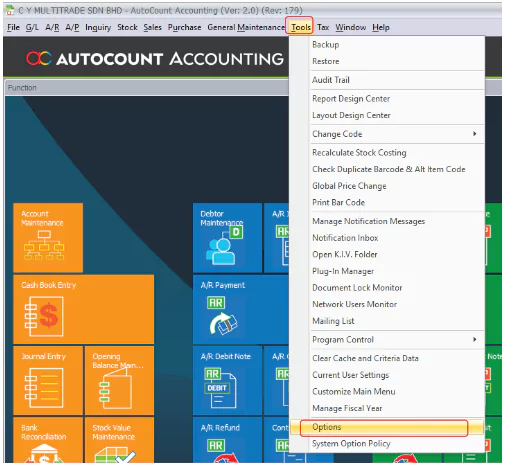
2. Then, click General > Application Settings.

← Chapter 4.5 - Set Line Discount Post to Separate AccountChapter 4.7 - Stock Item Type Maintenance →

C Y Multitrade Sdn Bhd

Reg. No. 202001009028 (1365348-A)

  • Follow
  • Follow

Contact Info



012-2200380
012-2200370



customerservice@cy-grp.com


No. 18A, Jalan LP 1A/1,
Taman Lestari Perdana,
43300 Seri Kembangan,
Selangor, Malaysia.

Quick Links

About Us

Careers

Contact

Dealer Enquiries

Resources

AutoCount V2 Help Files

AutoCount Stock Training Note

AutoCount POS 5.0 Training Note (Front End)

AutoCount Accounting 2.0 New Features

AutoCount Fixed Asset Plugin

© Copyright 2024 C Y Group. All Rights Reserved.