AutoCount e-Invoice Note 19 Nov 2026
1. Import Supplier e-Invoice From MyInvois Portal
1.1 Import Supplier e-Invoice in AutoCount
What is the function of Import Supplier e-Invoice in AutoCount?
AutoCount Import Supplier e-Invoice 功能
|
|
|
|
1.2 How to Import Supplier e-Invoice
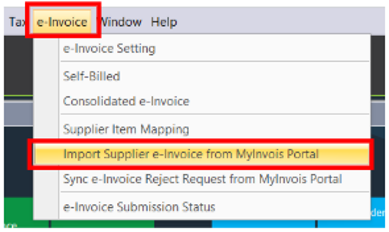
1. First, go to e-Invoice > Import Supplier e-Invoice from MyInvois Portal. 首先,打开 e-Invoice > Import Supplier e-Invoice from MyInvois Portal
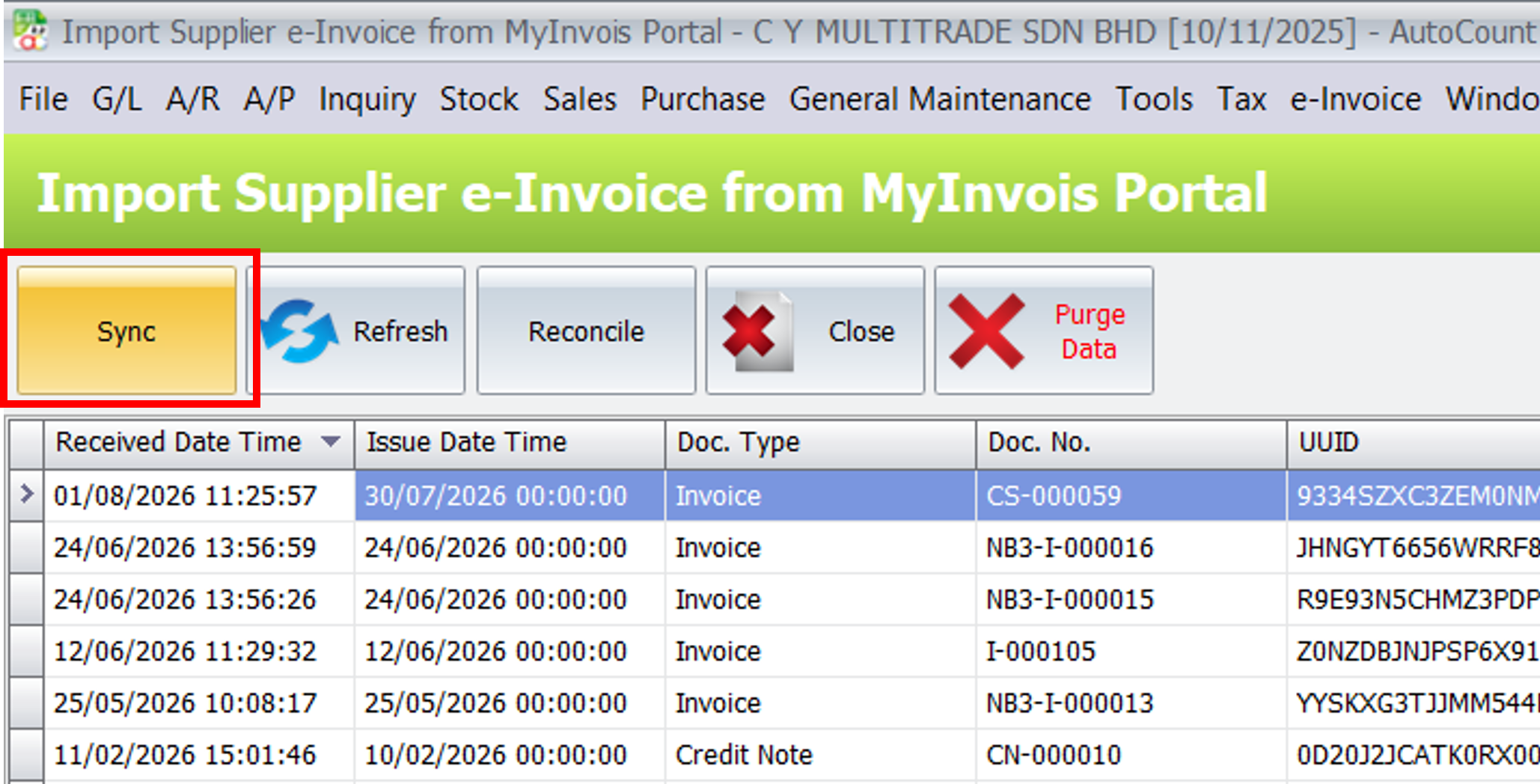
2. Click on Sync to import. 点击 Sync 以导入
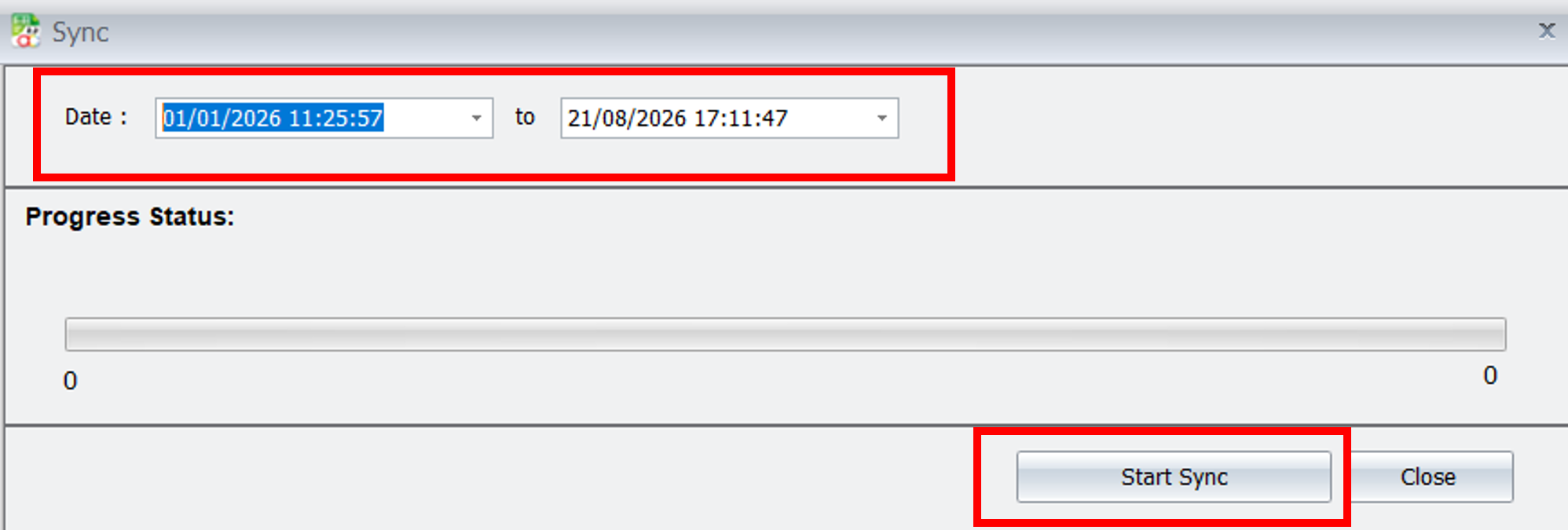
3. Set the Date Range, then click Start Sync. 设置日期范围,点击 Start Sync
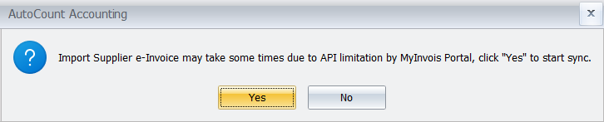
4. Click Yes to continue. 点击 Yes 以继续
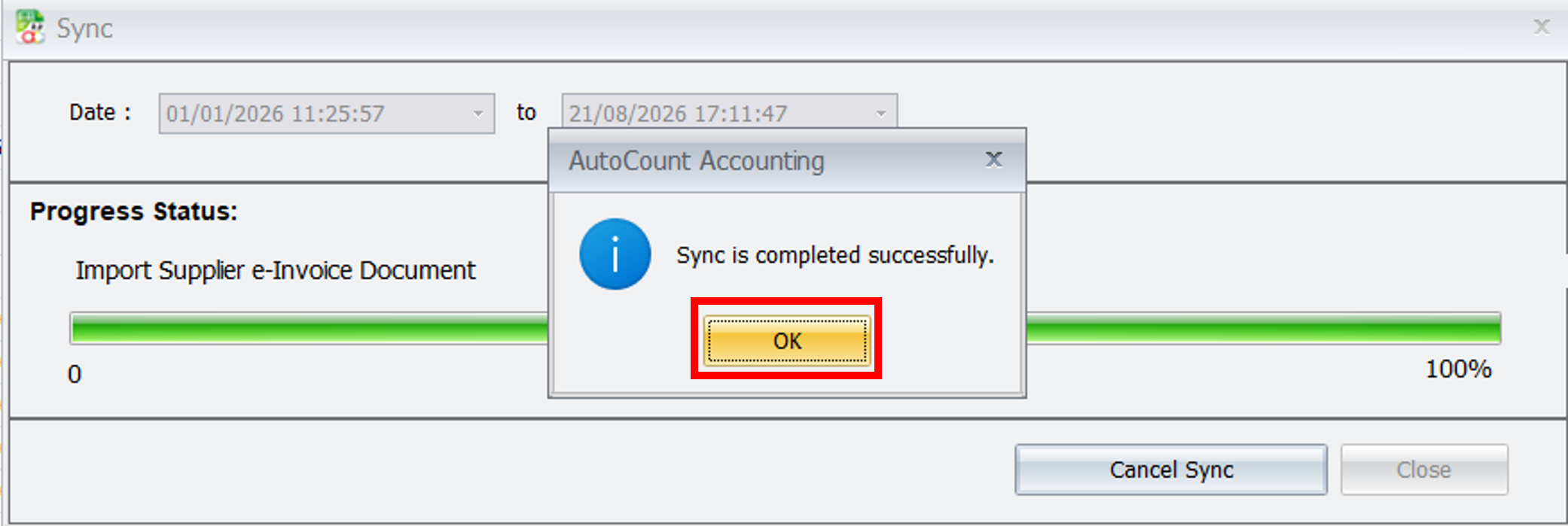
5. Click OK after system done sync. 系统完成同步后点击 OK
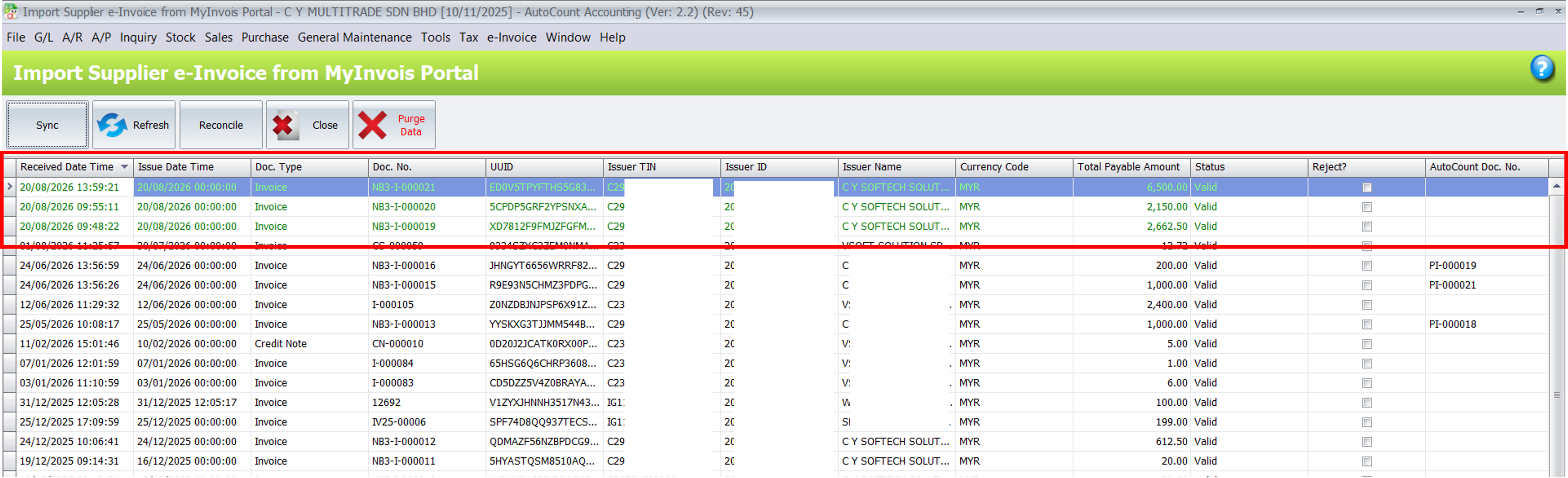
Successfully import e-Invoices issued by suppliers from MyInvois Portal!
成功将 MyInvois Portal 里 supplier 开具的 e-Invoices 导入进 AutoCount!
1.3 Reject Supplier e-Invoice 拒收供应商电子发票
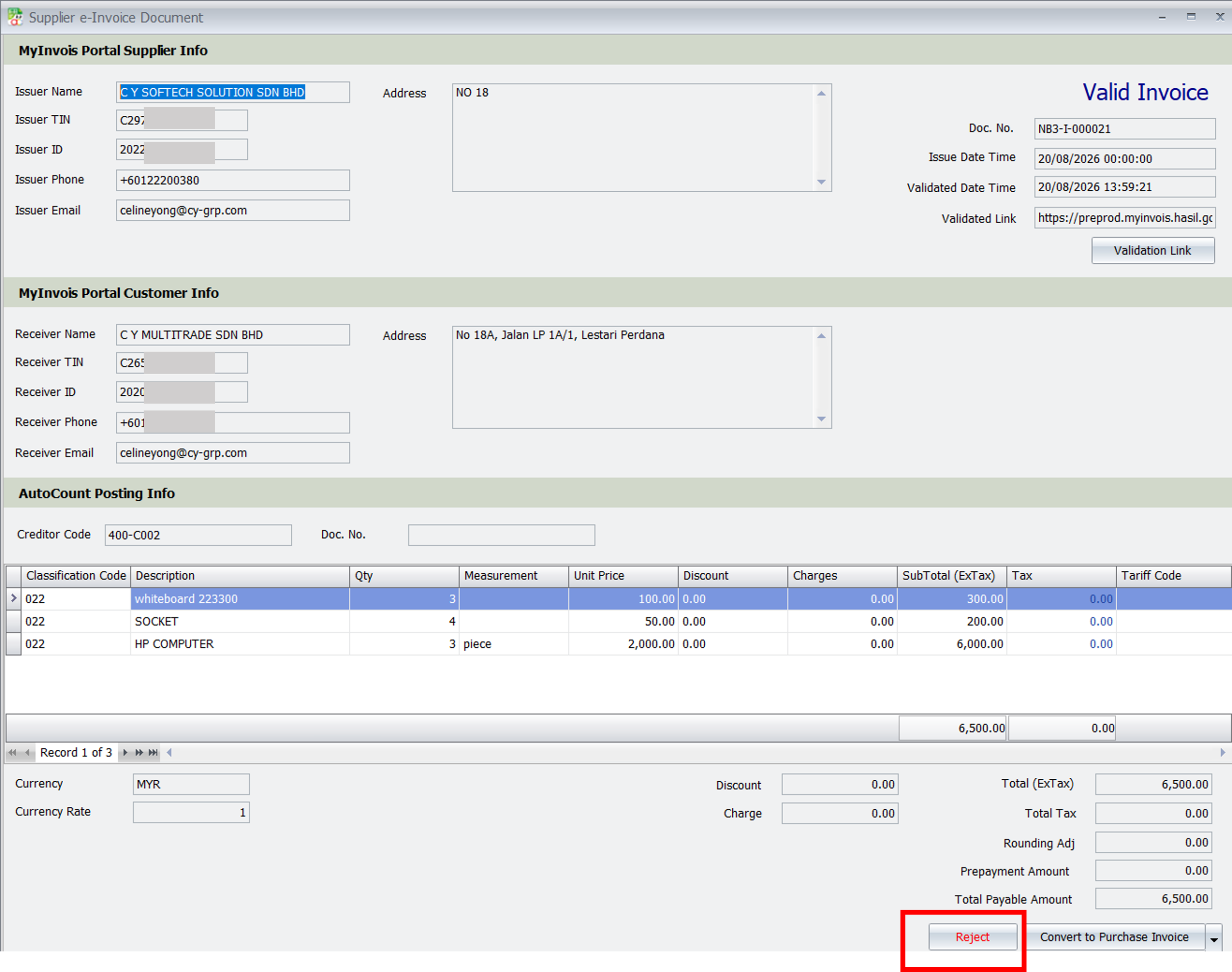
Double-click to view the supplier e-Invoice 双击以查看 Supplier e-Invoice
You can choose to reject this Supplier e-Invoice in the bottom right corner if the e-Invoice have error
若该电子发票有错,你可以在右下角选择拒收该电子发票
1.4 Convert Supplier e-Invoice
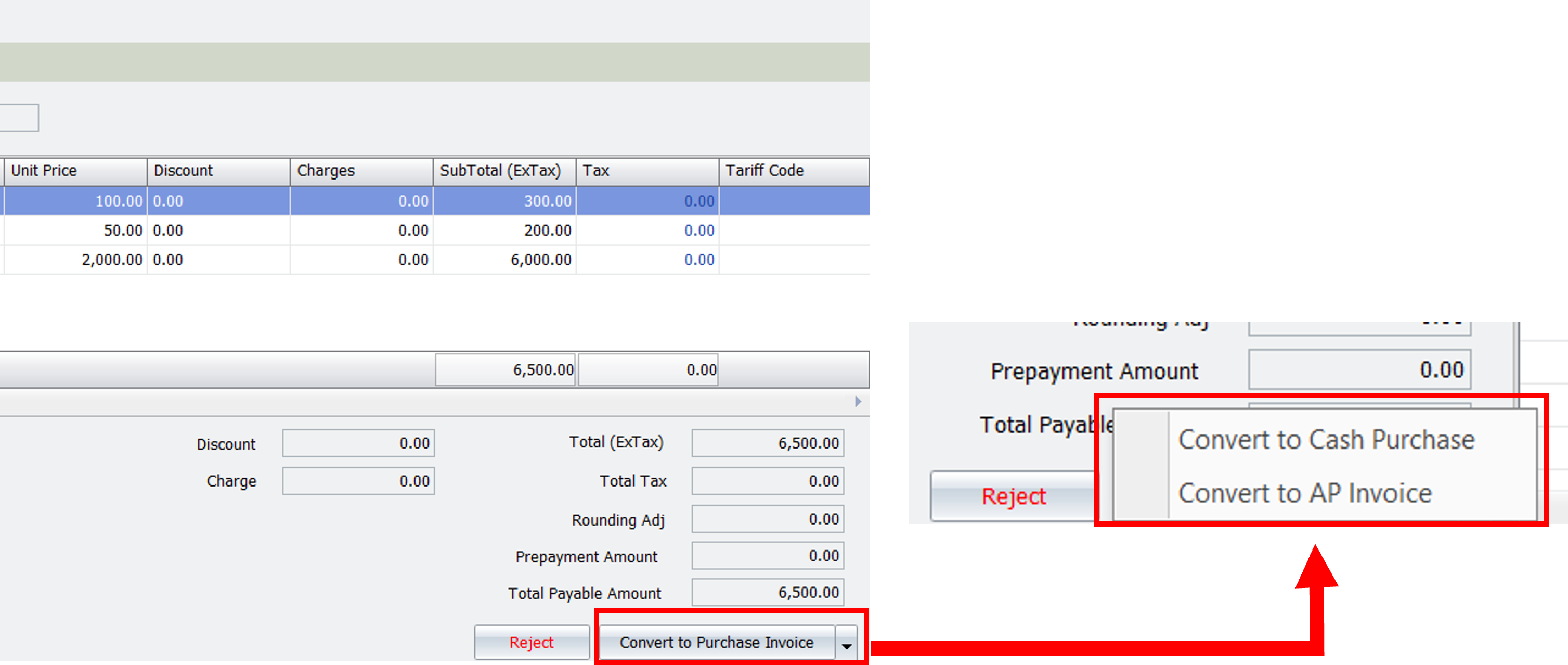
1. Click the Convert to Purchase Invoiceor drop-down menu button next to the convert button to select conversion to other file types
点击Convert to Purchase Invoice或下拉菜单按钮可选择转换成其他文件
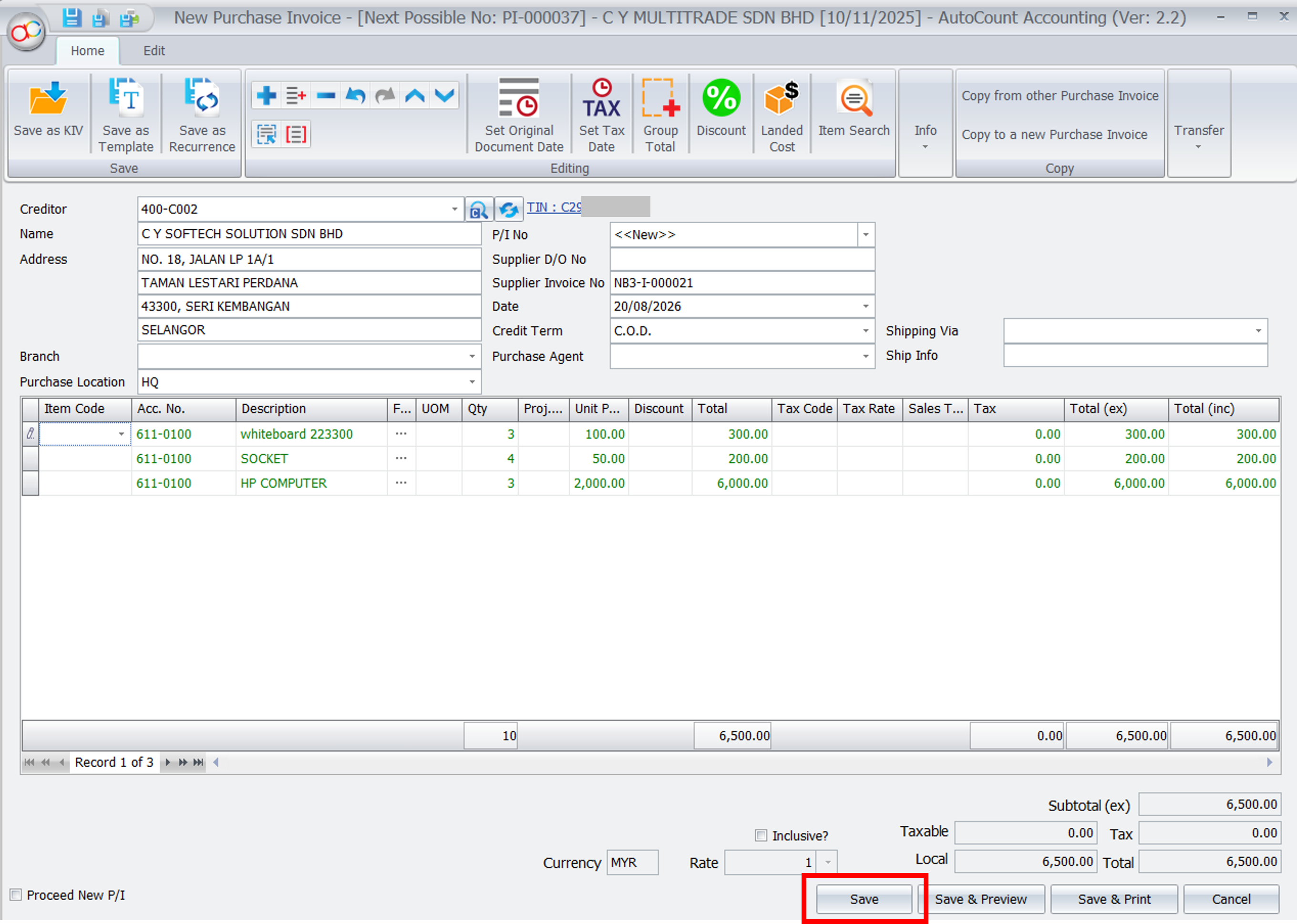
2. Check the information, select the item code, then you can click “Save” to save if everything is correct
核对信息,选择 item code,确保无误后可点击 Save 以保存
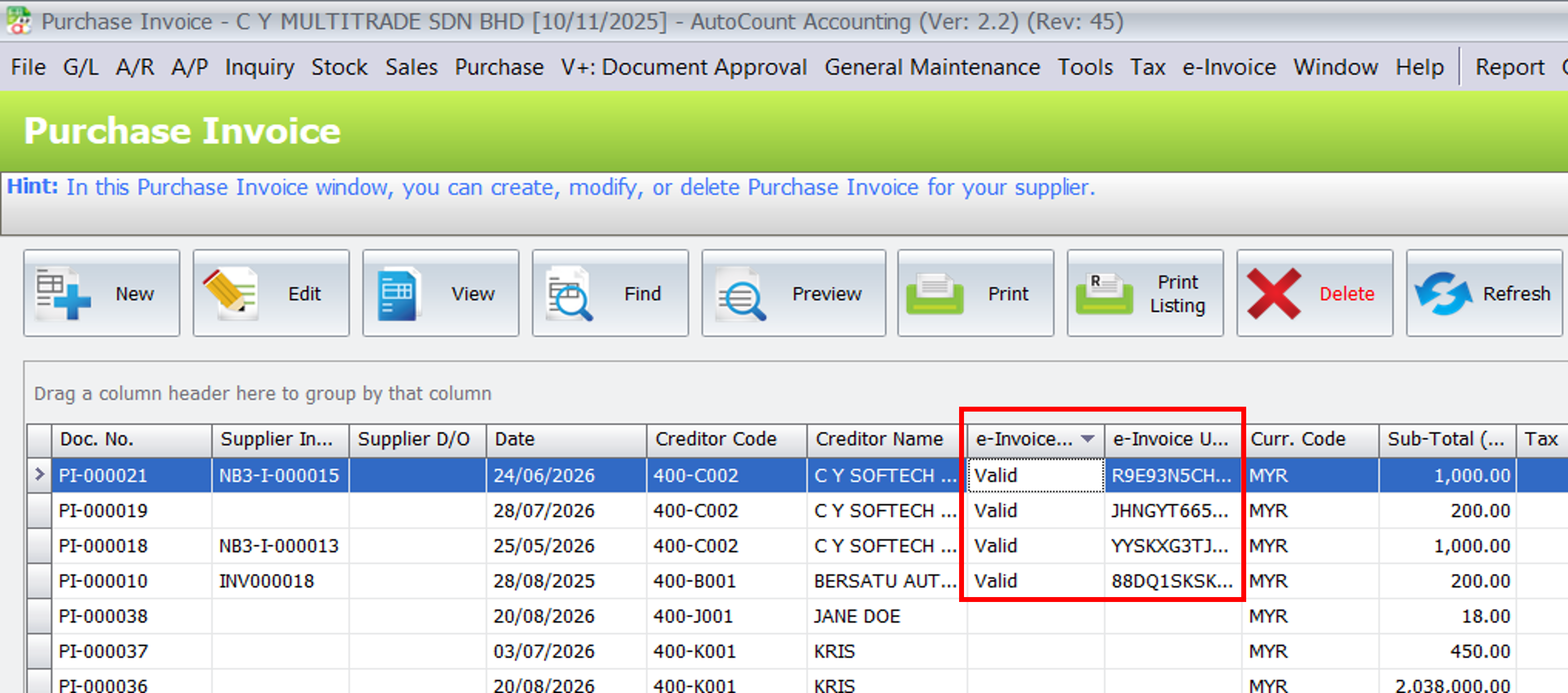
3. Go to Purchase > Purchase Invoice, system will auto update the e-Invoice related information
打开 Purchase > Purchase Invoice ,系统会自动更新 e-Invoice 相关的信息
2. Reconcile Supplier e-Invoice
2.1 How to Reconcile Supplier e-Invoice
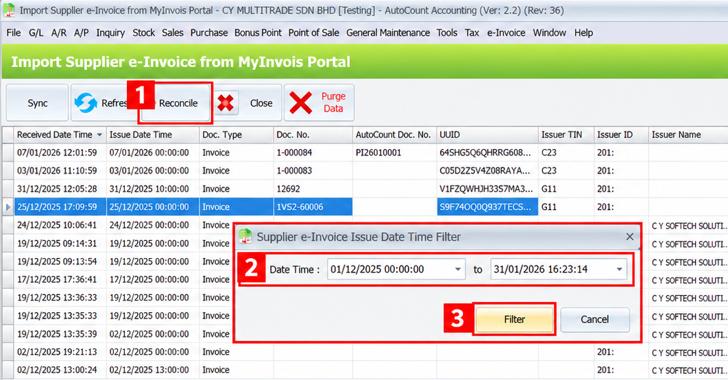
1. First, go to e-Invoice tab > Import Supplier e-Invoice > click on “Reconcile” button.
首先,去到e-Invoice tab > Import Supplier e-Invoice >点击 “Reconcile” 按钮
2. Set the issue date time range 设置日期范围
3. Click on Filter button. 点击Filter按钮
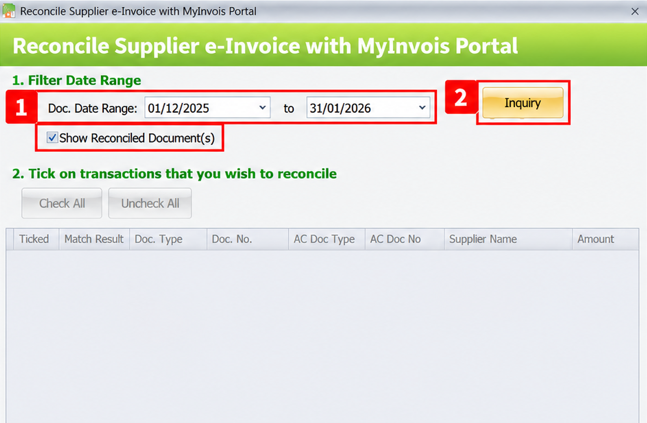
Set the data range and click on Inquiry
设置日期范围并点击 Inquiry
*Note: to view reconciled documents, tick “Show Reconciled Document(s)”
*注意:若要查看已经reconcile的文件,勾选 “Show Reconciled Document(s)”
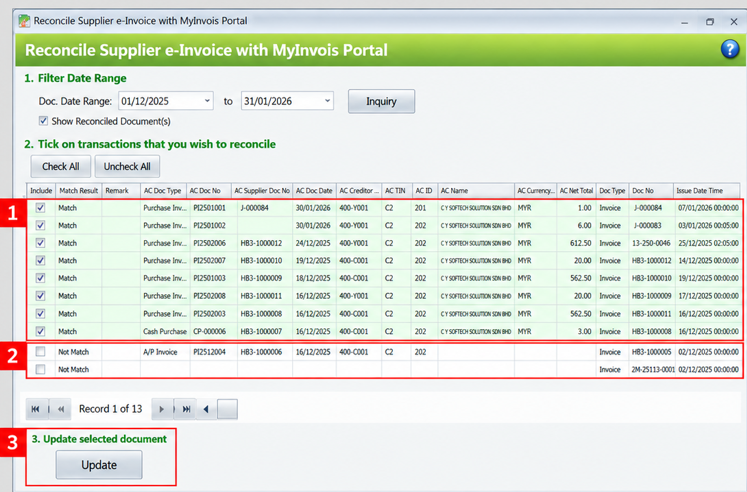
1. Green means the Supplier Invoice No., TIN, BRN, and Amount are matched with system records
绿色表示该交易和系统记录的 Supplier Invoice No., TIN, BRN, 以及价格都符合
2. White color “Not Match” means the transaction has not been entered into AutoCount
白色显示 “Not Match” 的则表示该交易还未输入进系统
3. Select the matched transaction and click “Update” to update the record in system
选择 matched 的交易并点击“Update”以更新系统内的记录
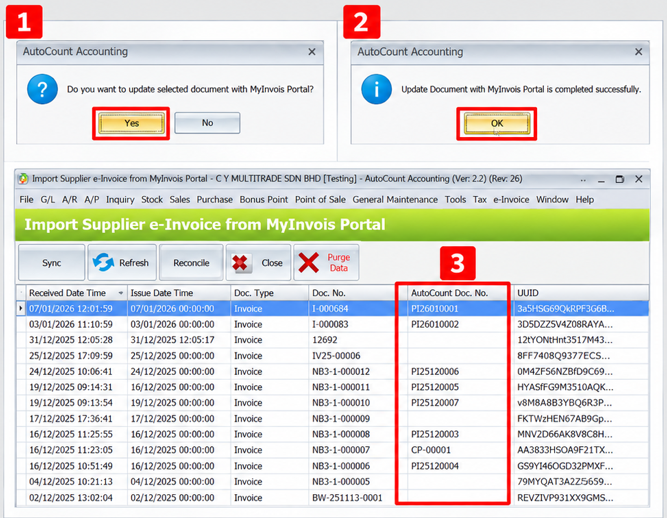
Click “Yes” to continue, click “OK” after system done sync
点击 “Yes” 以继续,系统完成同步后点击 “OK”
After the update, the AutoCount document number will be shown (3)
更新后会显示 AutoCount document number (3)
3. Self-Billed e-Invoice
3.1 Type for Self-Billed e-Invoice 自开电子发票适用类型
| Type | Supplier | Buyer (Self-Billing) |
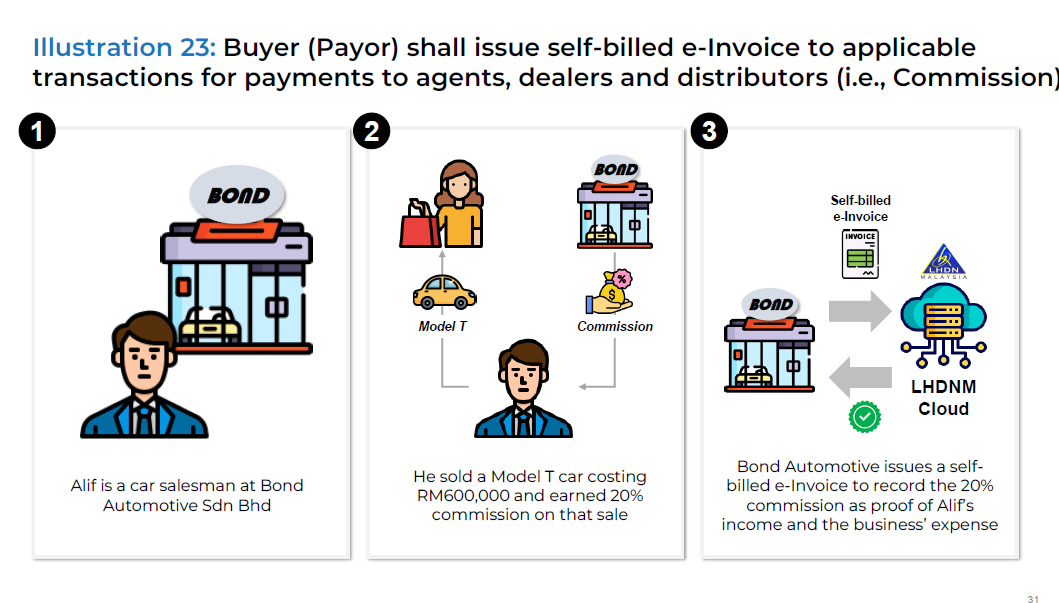
Payment to agents, dealers, distributors 向代理 / 经销商 / 分销商付款 | Agents, dealers, distributors 代理 / 经销商 / 分销商 | Taxpayer that makes payment 付款的纳税人 |
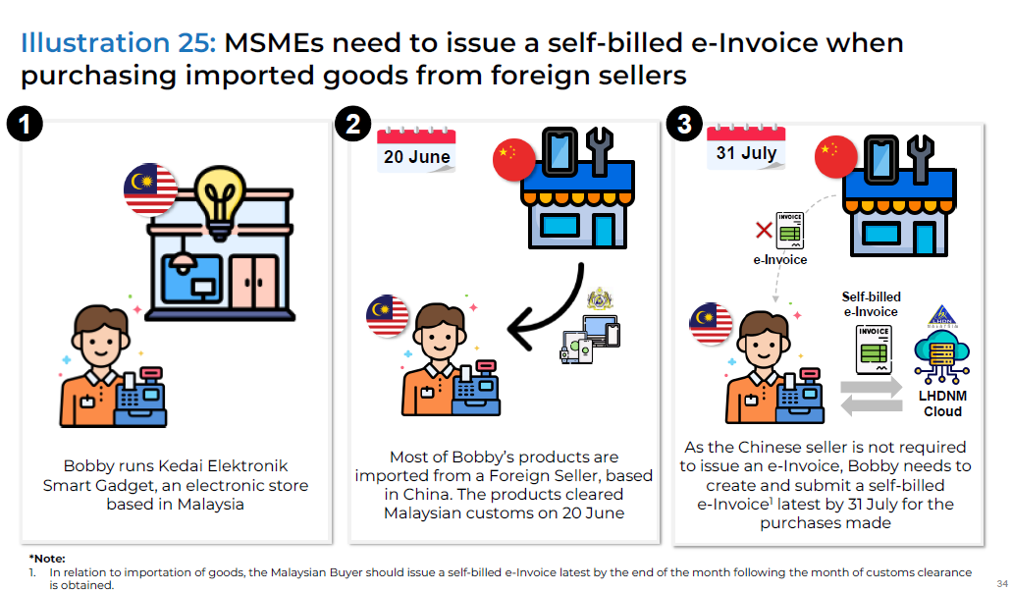
Foreign suppliers 国外供应商 | Foreign seller 国外卖家 | Malaysia purchaser 马来西亚采购商 |
Profit distribution / dividend 利润分配 / 股利分配 | Recipients of distribution 分发的接收者 | Taxpayer that makes distribution 进行分配的纳税人 |
E-Commerce 电子商务 | Merchant / Service provider / Driver / Rider 商家 / 服务提供商 / 司机 / 骑手 | E-Commerce / intermediary platform 电子商务 / 中介平台 |
Pay-out to betting & gaming winners 支付给博彩和游戏获胜者 | Recipient of pay-out 付款接收人 | Licensed betting & gaming provider 持牌博彩和游戏提供商 |
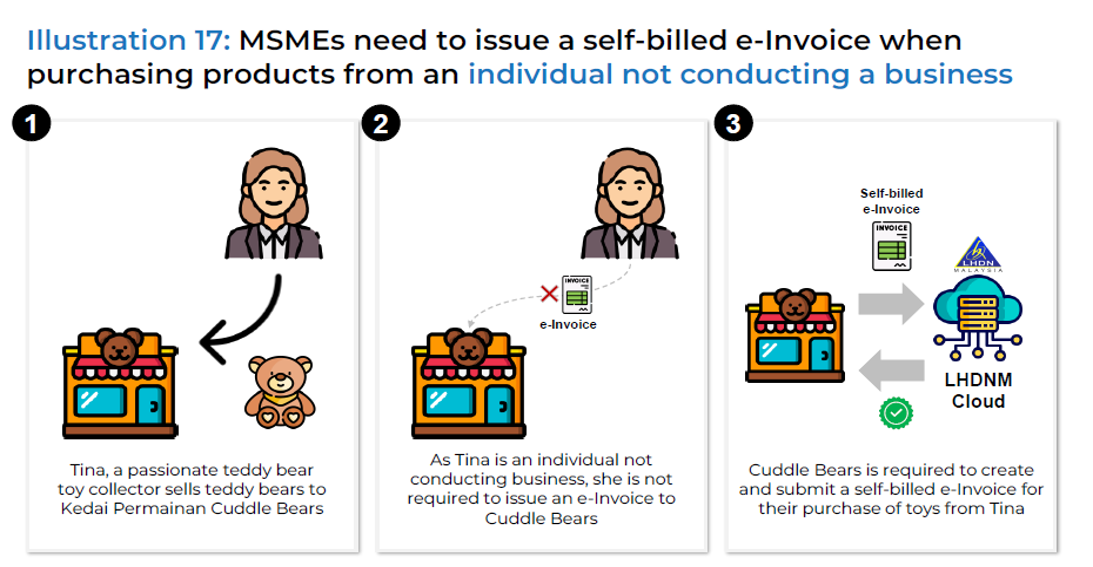
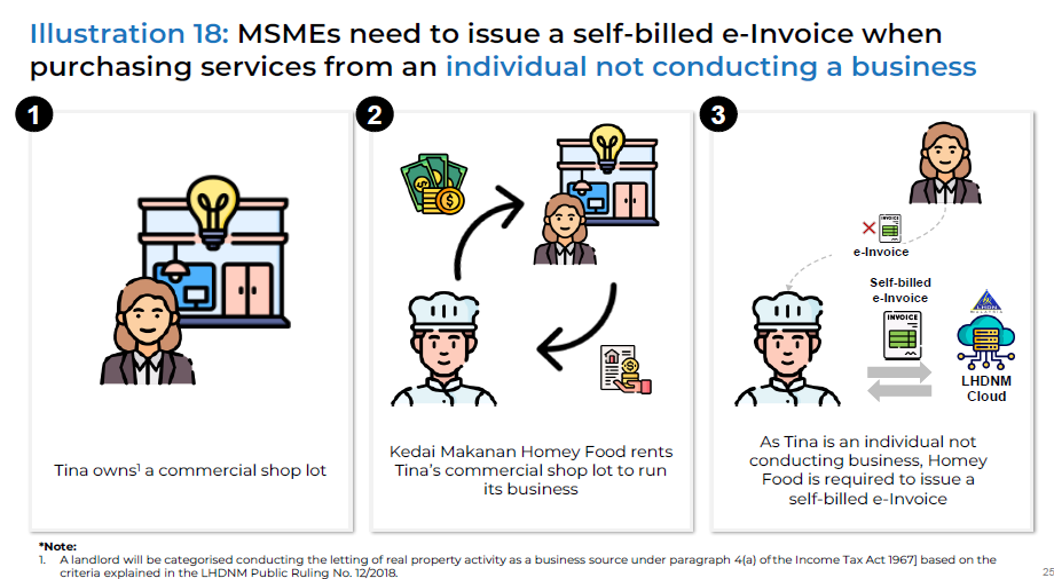
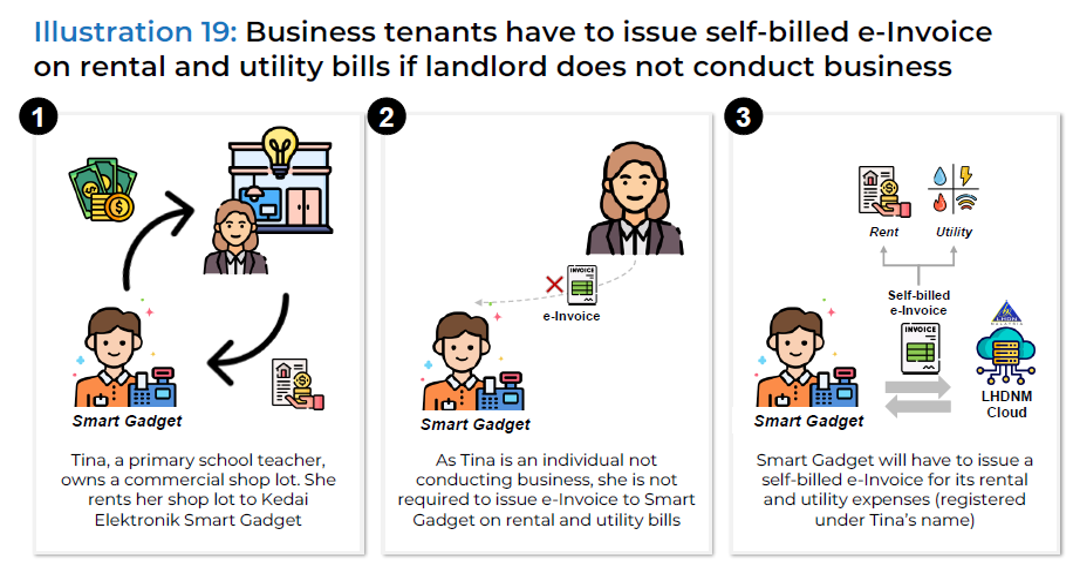
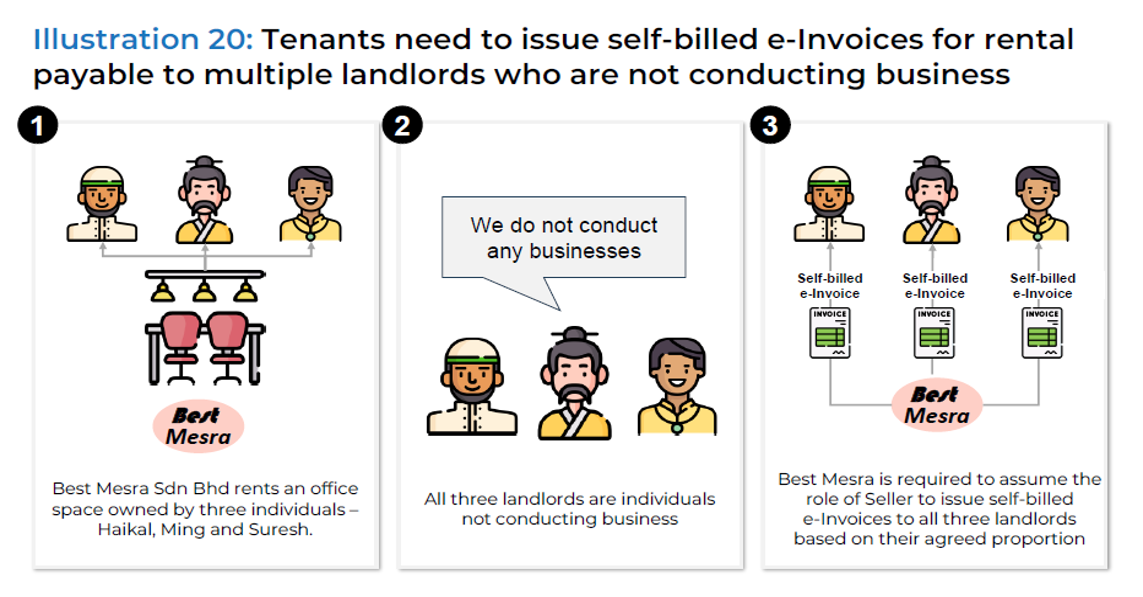
Acquisition from individual not conducting business 向非经营个人购买商品/服务 | Individual taxpayer providing goods/services 提供商品/服务的个人纳税人 | Person acquiring goods/services 取得商品/服务的人 |
Rebate / payment / credit in periodic statement 定期账单中的付款 / 信用 / 回扣 | Recipient of payment / credit 付款 / 信用接收人 | Taxpayer that makes payment / credit 付款 / 贷记的纳税人 |
Interest payment 利息支付 | Recipient of interest 利息接收者 | Taxpayer that makes interest payment 支付利息的纳税人 |
*Self-billing is only allowed for specific circumstances provided under the e-Invoice Specific Guideline.
*自开电子发票只允许用于 e-Invoice Specific Guideline 列明的情况
3.2 Self-Billed e-Invoice-Individual Not Conducting Business
向非经营个人购买时的自开电子发票
Buyer needs to issue a self-billed e-Invoice when purchasing goods or services from an individual who is not conducting a business.
买方向非经营业务的个人购买商品或服务时,买方需要开具自开电子发票。
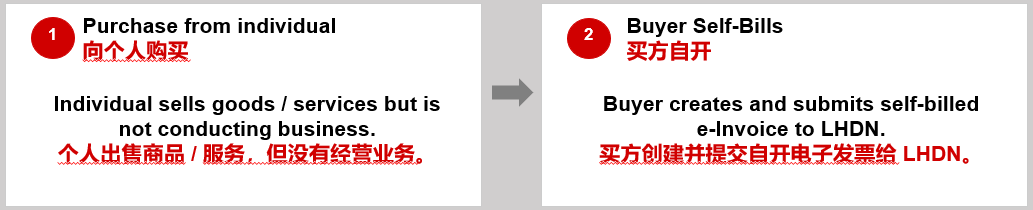
AutoCount actions AutoCount 操作:
1) Create Payment Voucher to record purchase 创建 Payment Voucher 记录采购
2) Create Self-Bill e-Invoice to report the expense 创建 Self-Bill e-Invoice 申报费用
3.3 Important Rule: When Self-Billing is Allowed 重要规则:何时允许自开电子发票
Do NOT issue self-billed e-Invoice simply because the supplier did not issue an e-Invoice.
不能仅因为供应商没有开具电子发票,就自行开具自开电子发票。
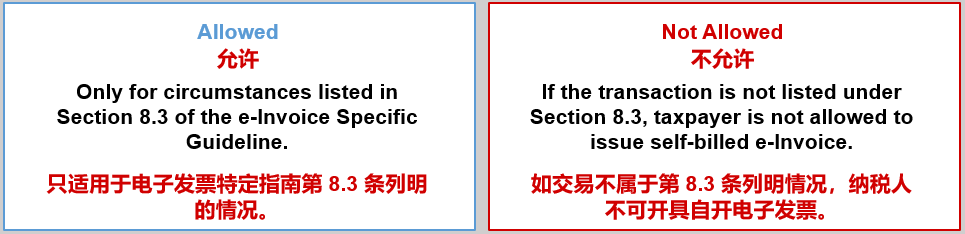
Practical check: Identify transaction type → Confirm it falls under allowed self-billing category → Issue self-billed e-Invoice
实务检查:确认交易类型 → 确认属于允许自开类别 → 才开具自开电子发票
Key point: self-billing is a specific exception, not a replacement for every missing supplier e-Invoice.
重点:自开电子发票是特定例外,并不是所有供应商未开票情况的替代方案。
3.4 Issue Self-Billed e-Invoice 自开电子发票
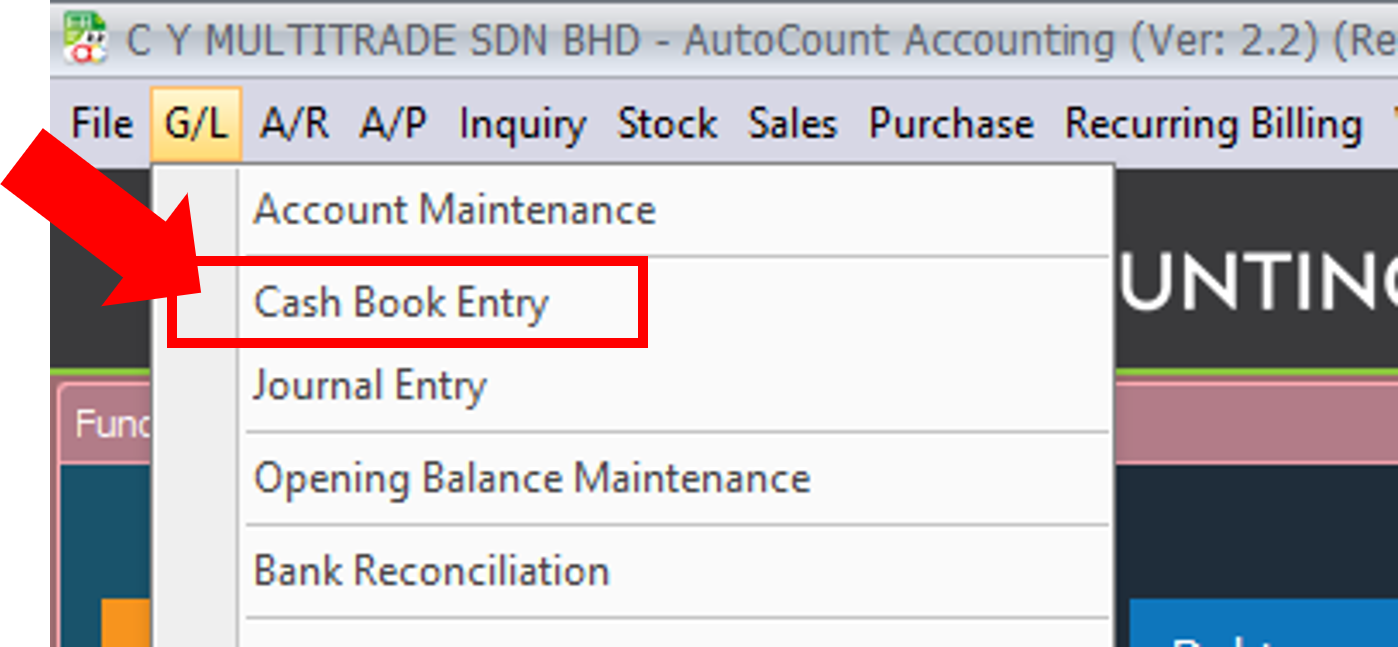
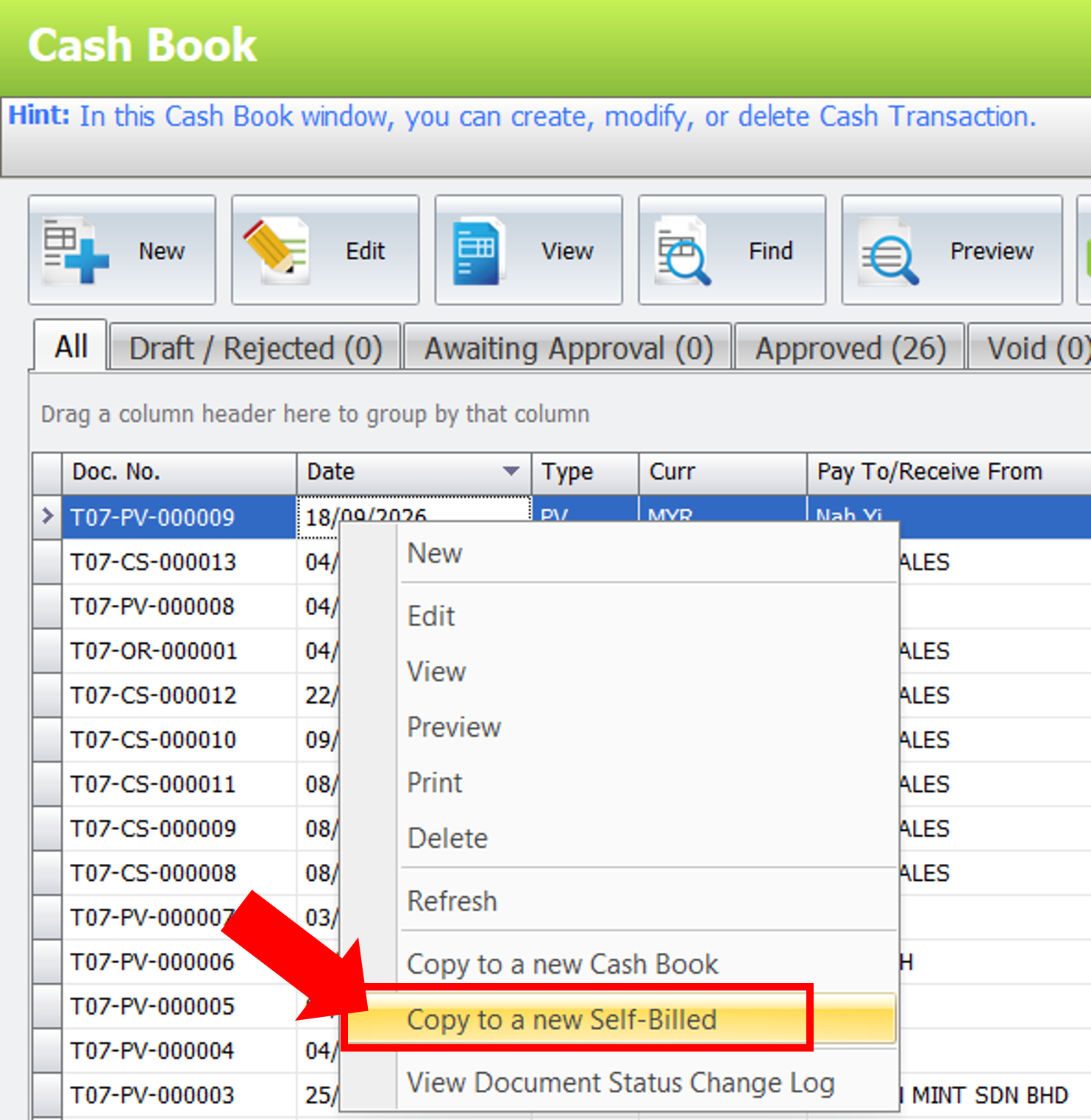
1. Go to G/L > Cash Book Entry. Right click on a payment voucher and select“Copy to a new Self-Billed”
点开 G/L > Cash Book Entry。右键单击一张payment voucher,然后选择 “Copy to a new Self-Billed”
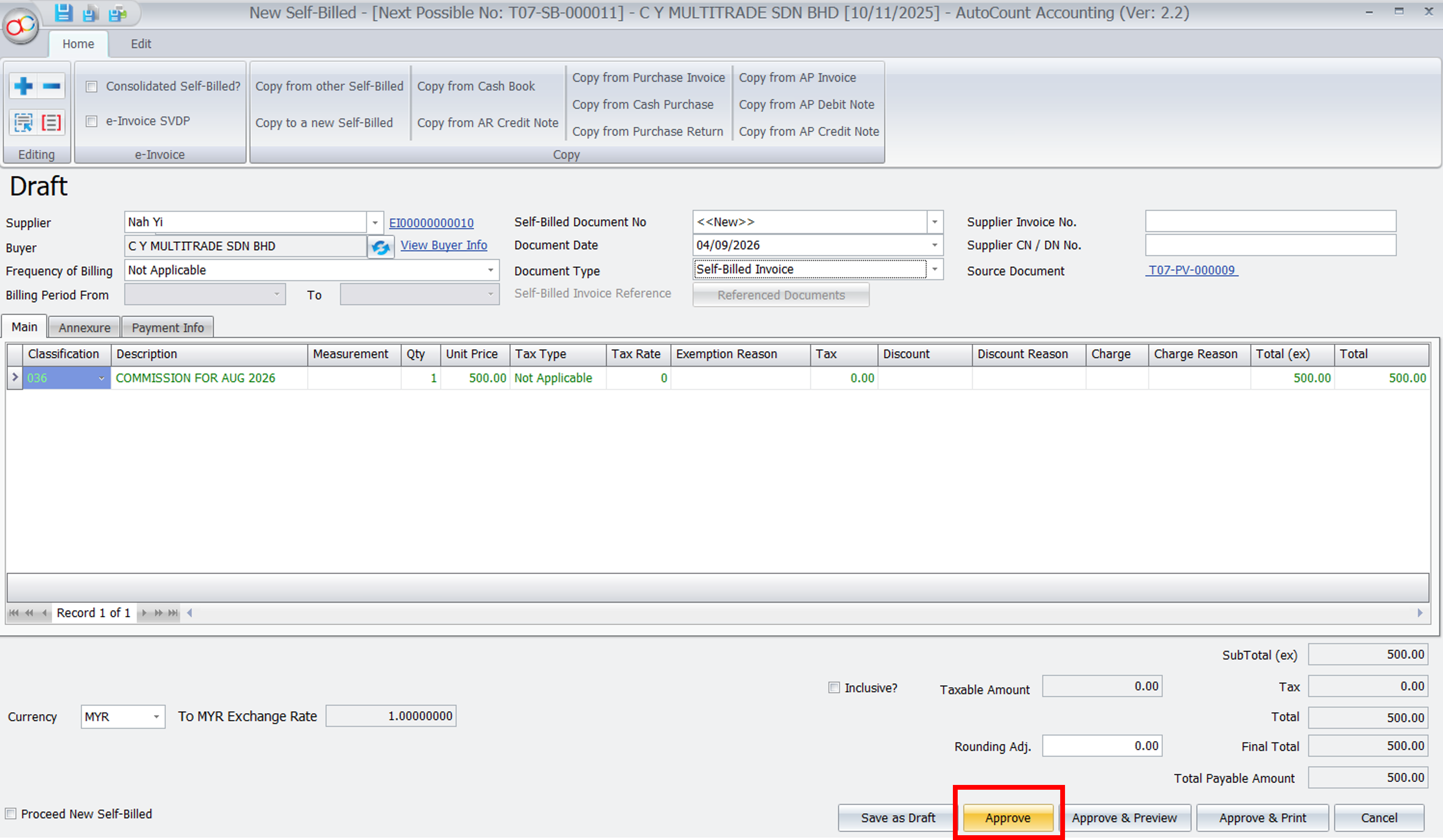
2. Click “Approve” if no any problem 确认无误后点击“Approve”
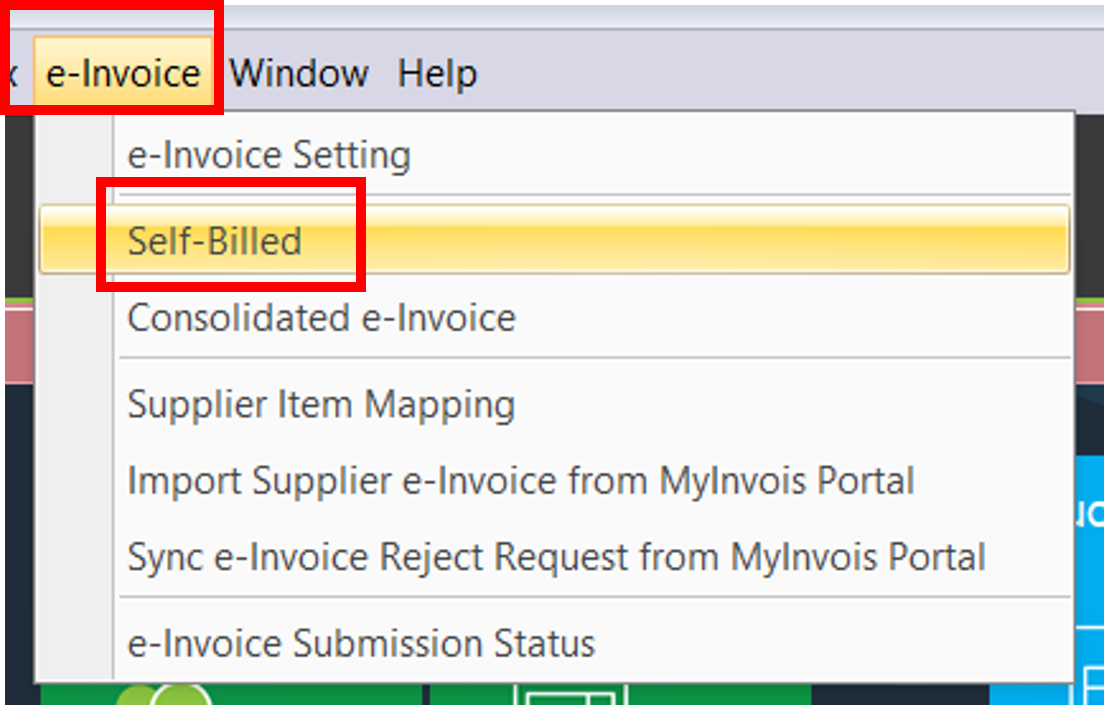
3. Go to e-Invoice > Self-Billed 打开e-Invoice > Self-Billed
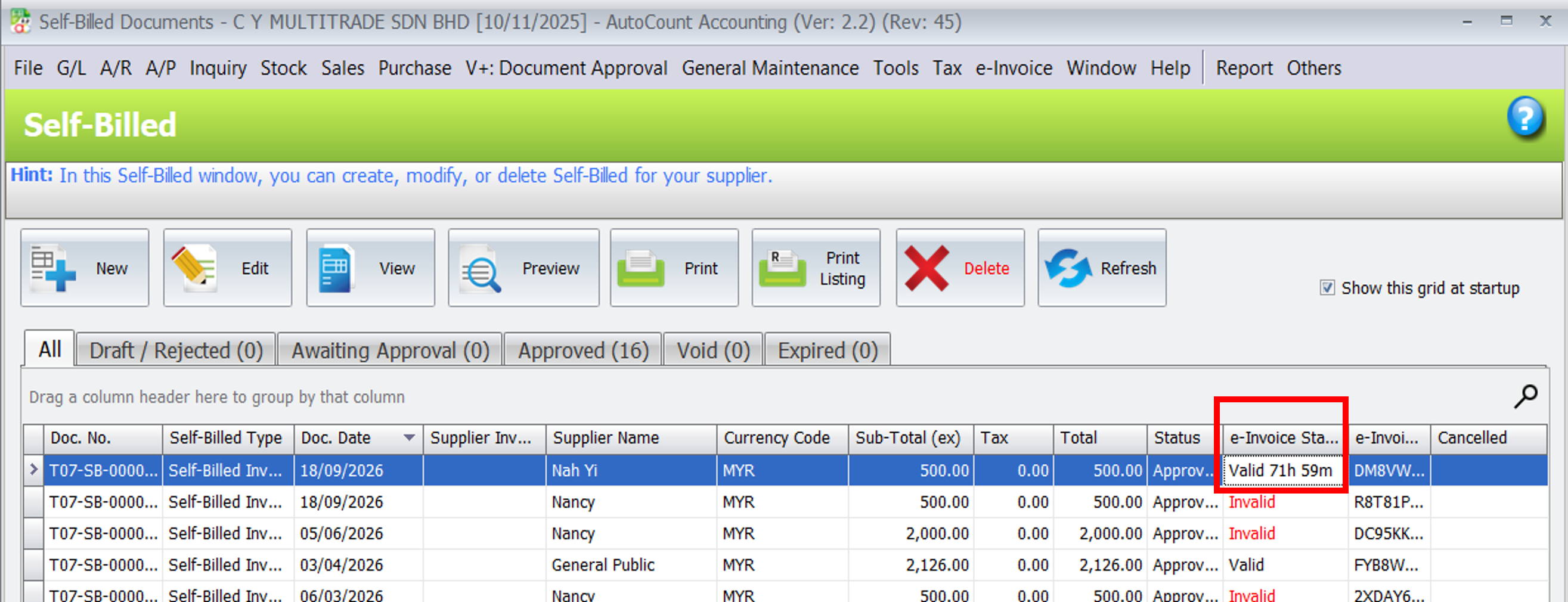
4. Click “Refresh”, the self-billed e-Invoice has been submitted and validated 点击 “Refresh”,自开电子发票已提交并通过验证
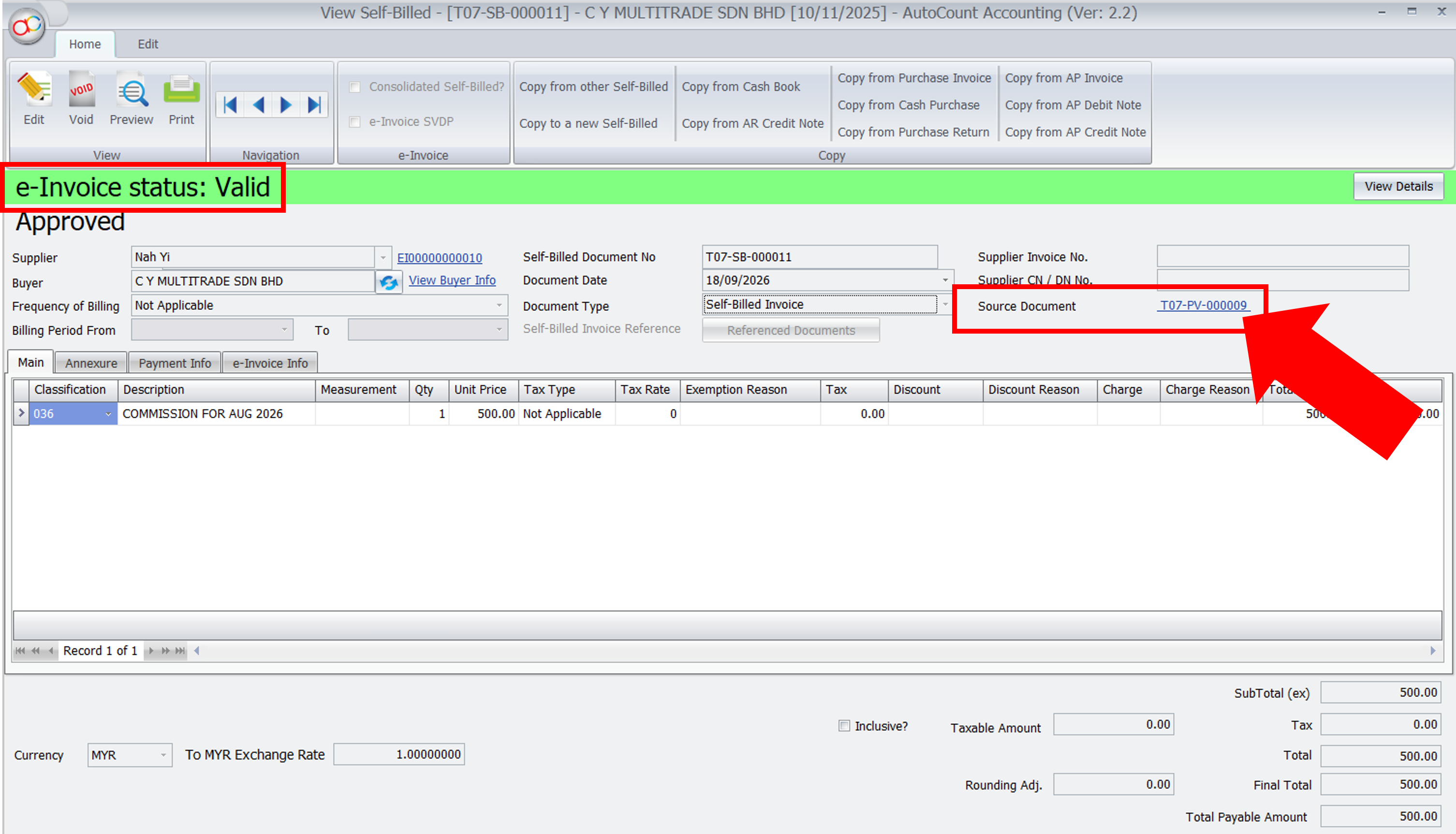
5. You can click on the source document number to view details 可点击源文档编号查看详细信息
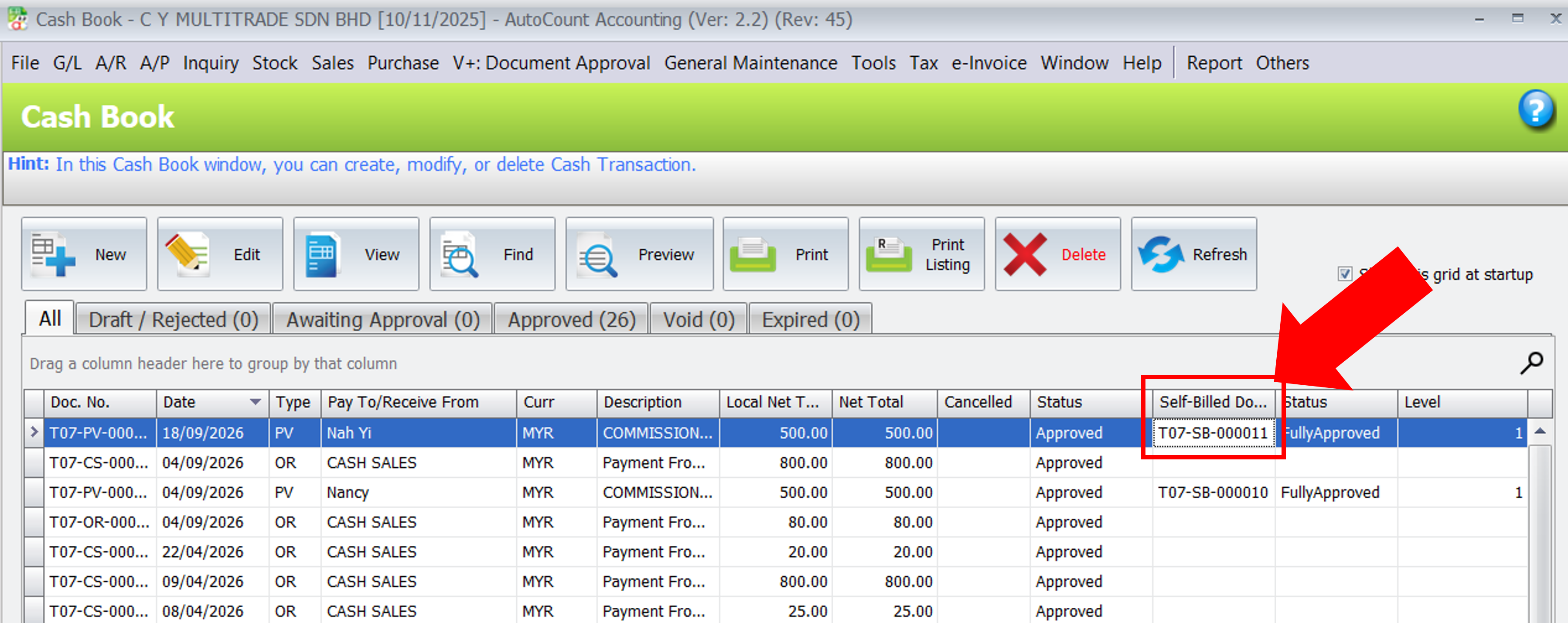
6. Go back to Cash Book and click“Refresh”, will show the self-billed document number
返回 Cash Book 并点击“Refresh”,将显示自开电子发票的编号
3.5 Issue Self-Billed e-Invoice to Individual
4. Allow Edit Tax Entity Even If Submitted e-Invoice
4.1 Allow Edit Tax Entity Fields after Submit e-Invoice
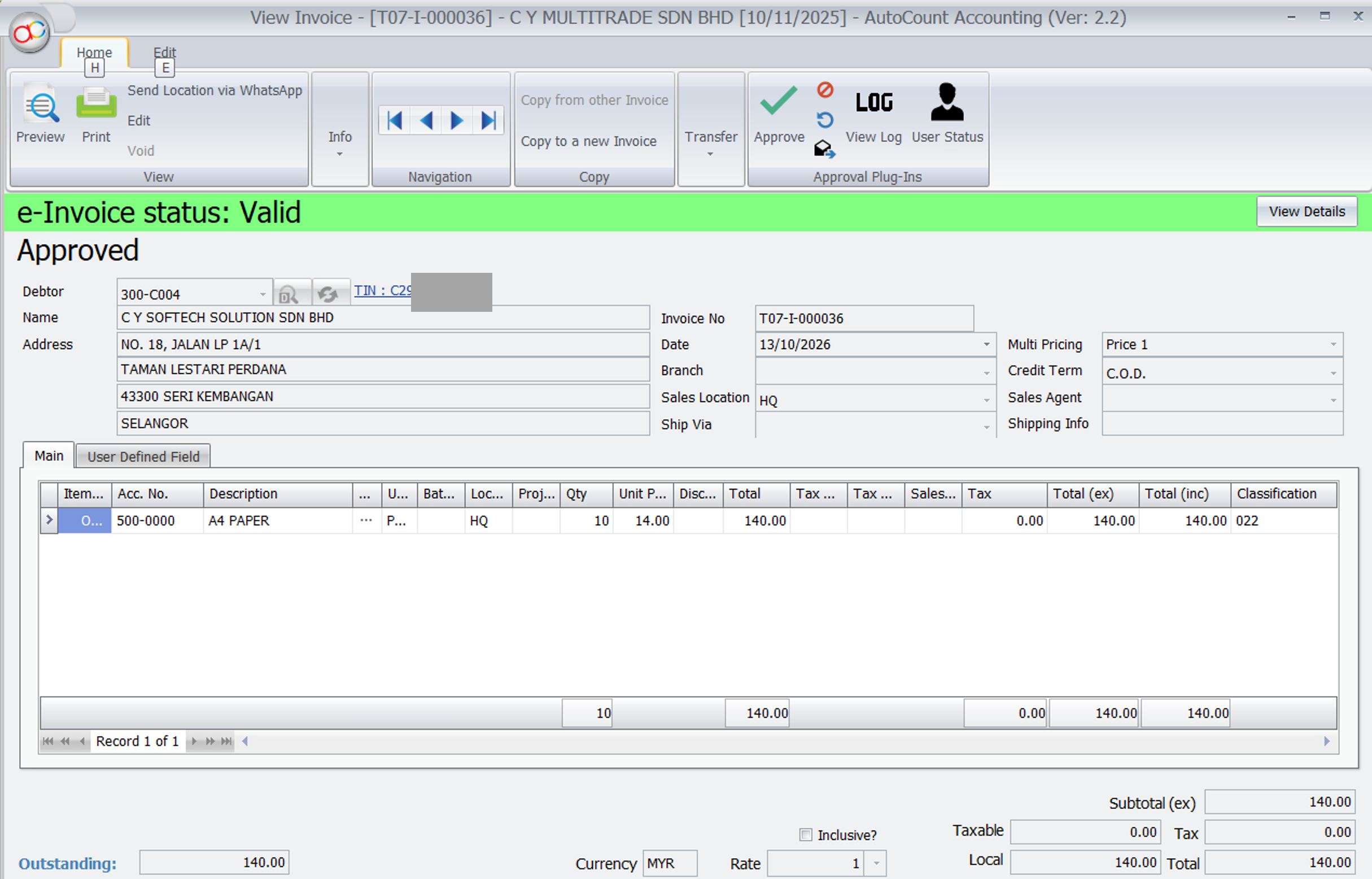
Tax Entity details can now be edited even after e-Invoice submission, reducing the need to use Merge TIN
即使提交了 e-Invoice,仍可编辑纳税人的详细资料,以减少使用 Merge TIN 的需求
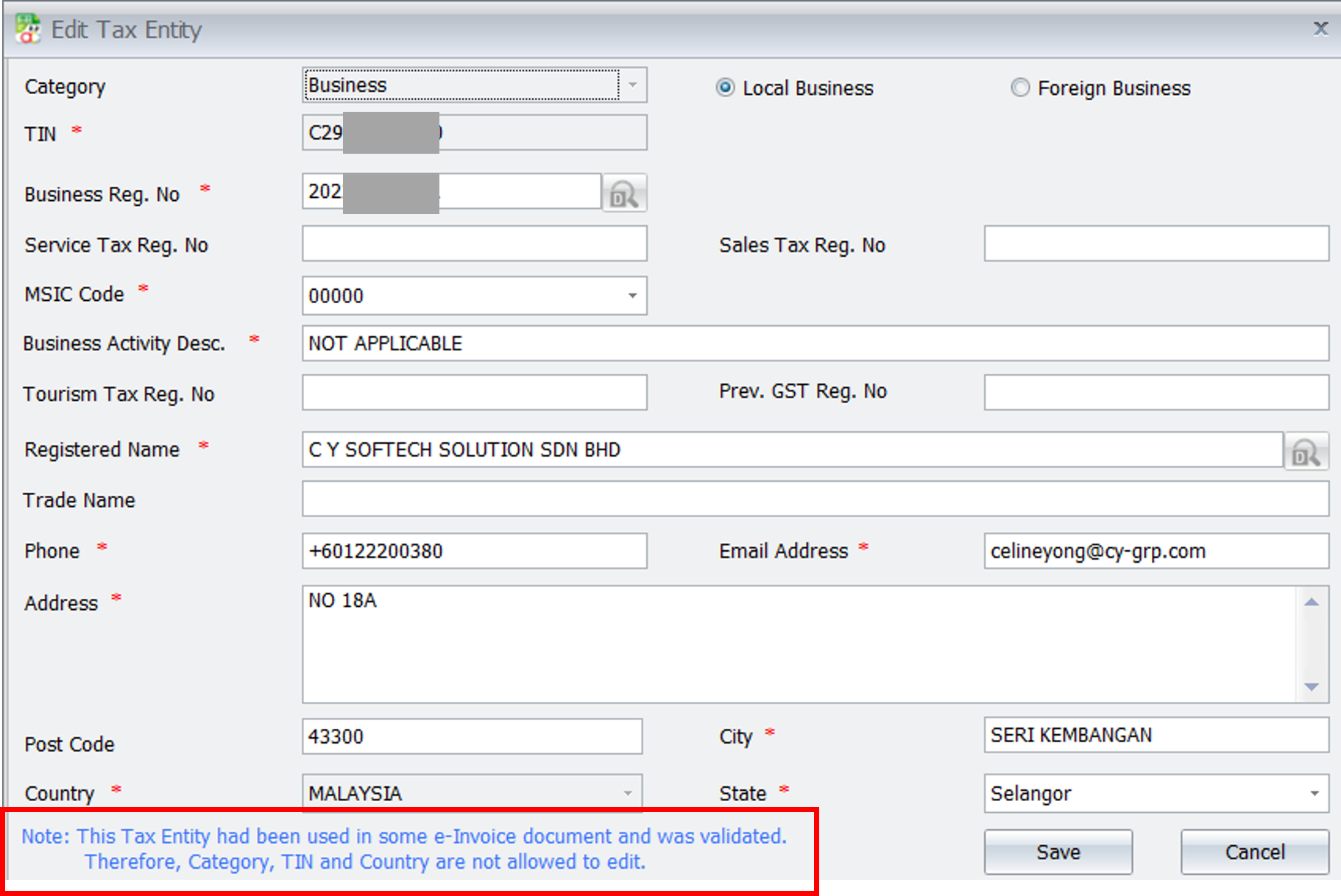
*TIN is still not allowed to directly edit
*TIN 仍不能直接更改
5. Transaction Exceeding RM10,000 Warning
5.1 Transaction Exceeding RM10,000 Warning
Starting from January 2026, LHDN requires transactions exceeding RM10,000 to be generated and submitted as e-Invoices.
从2026年1月起,LHDN要求金额超过 RM10,000 的交易必须生成并提交电子发票
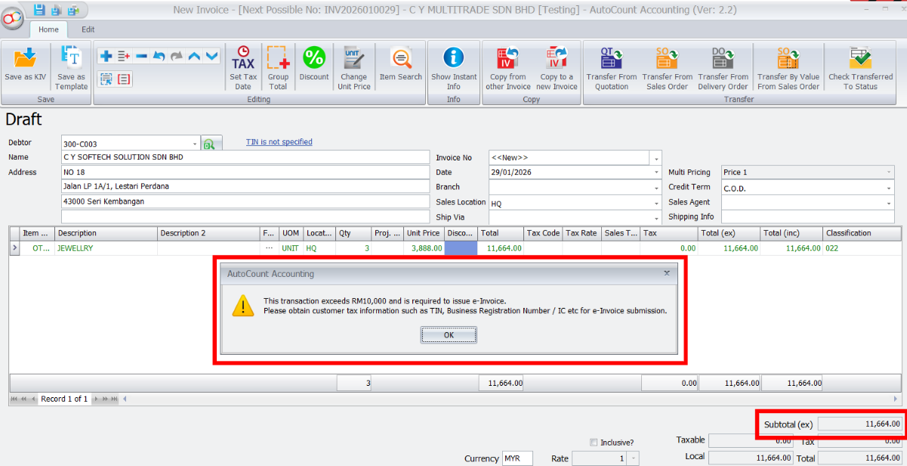
*For multi-currency transactions, local amount will be used to determine if it exceeds RM10,000.
*对于多币种交易,将以当地货币金额为准,判断其是否超过 RM10,000
6. Warning Message to Indicate AR Debit Note doesn’t Support e-Invoice
6.1 Warning Message to Indicate AR Debit Note Doesn’t Support e-Invoice
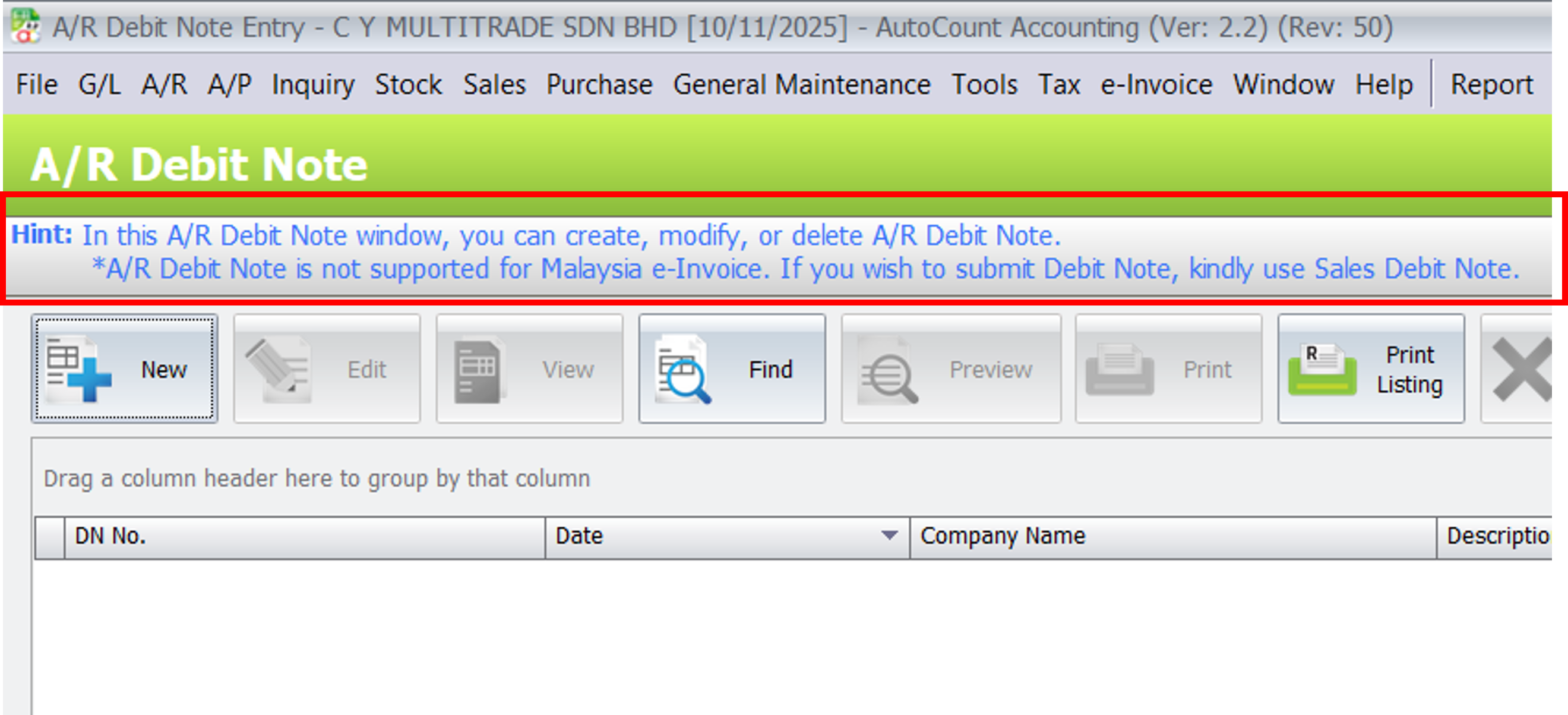
Added a reminder in AR Debit Note stating that e-Invoice submission is not supported, avoiding accidental creation of e-Invoice transactions here
在AR Debit Note中添加了提示,说明不支持提交电子发票,以避免在此处意外生成电子发票交易
7. TIN Show IG Prefix When Choose MyKad Identity Type
7.1 TIN Show IG Prefix When Choose MyKad Identity Type
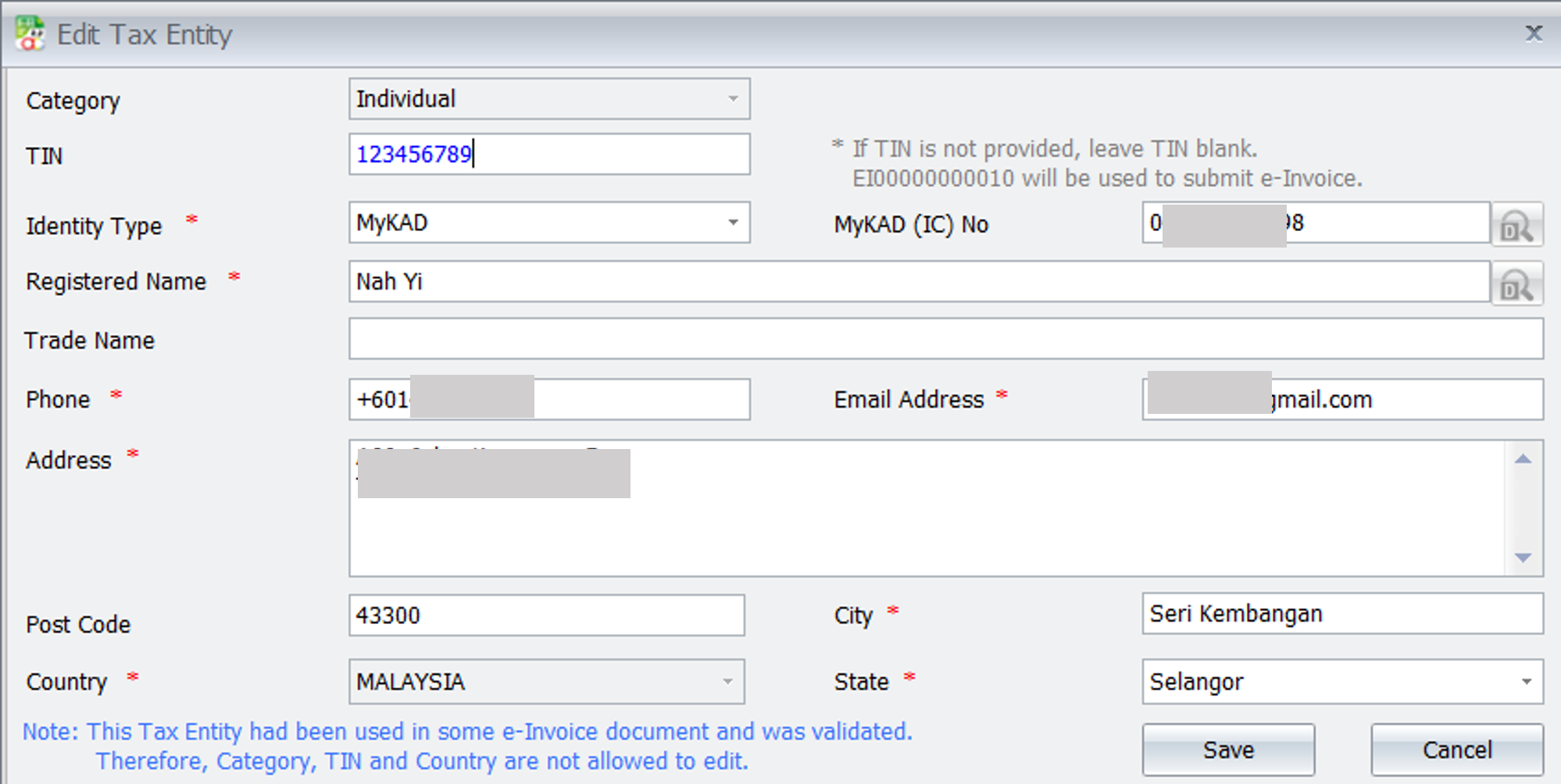
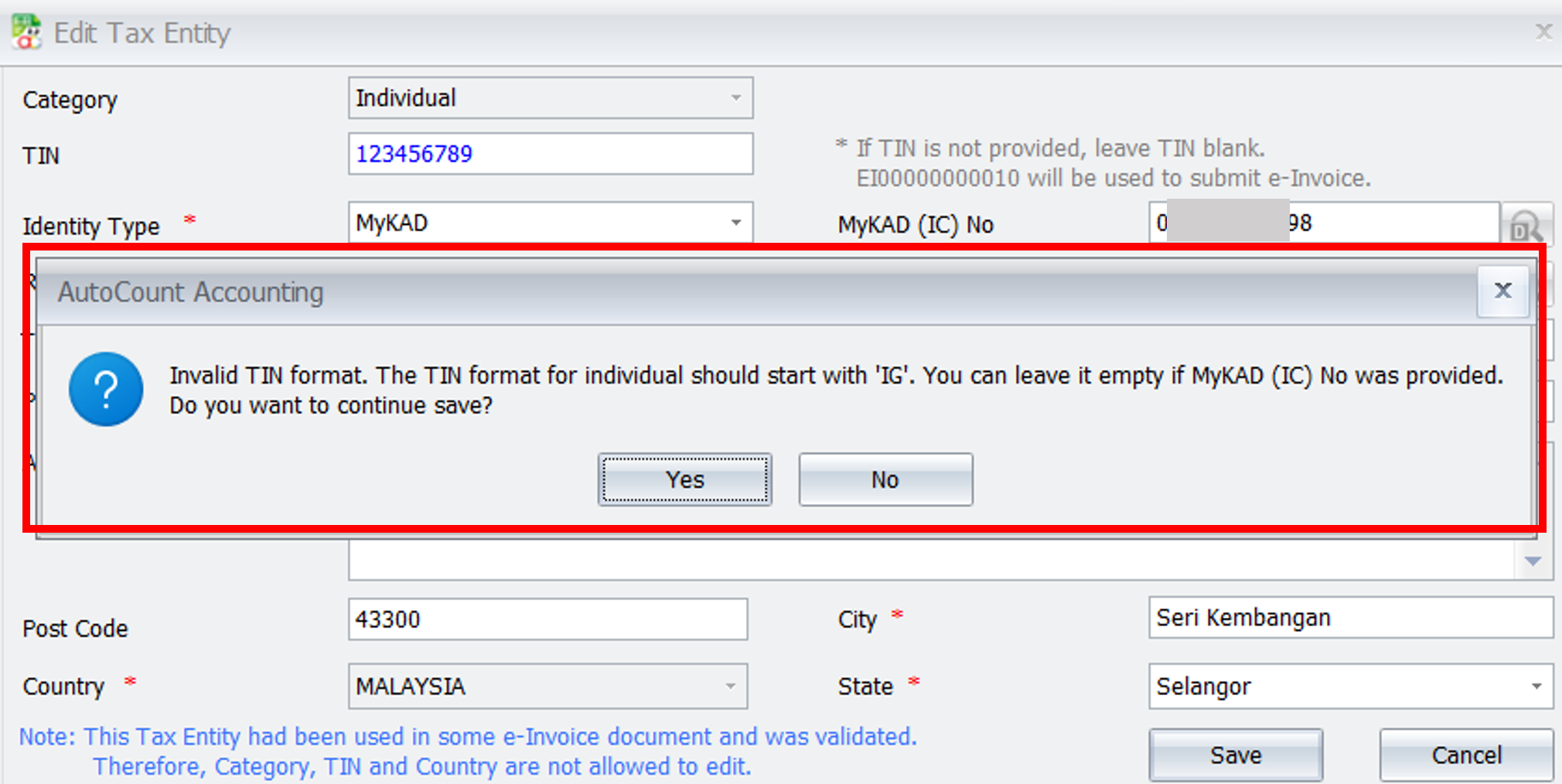
Added TIN validation during Tax Entity creation: when Identity Type is MyKad, any entered TIN must start with “IG” to save the record, reflecting Malaysia’s individual TIN format
当身份类型为 MyKad 时,所输入的任何纳税人识别号 (TIN) 必须以“IG”开头,以符合马来西亚个人纳税人识别号的格式
8. E-Invoice Special Voluntary Disclosure Programme (SVDP)
8.1 What is SVDP
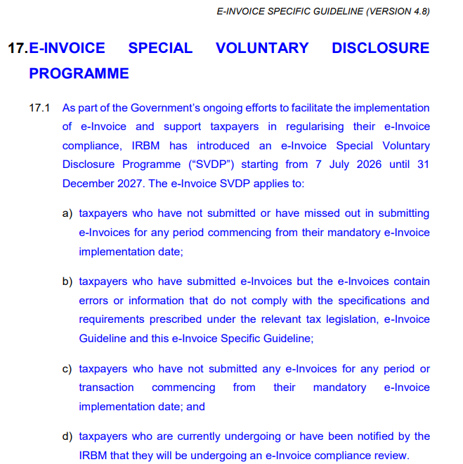
1. LHDN launches Special Voluntary Disclosure Programme (SVDP)
LHDN 推出特别自愿披露计划 (SVDP)
2. Aimed at encouraging eligible taxpayers to proactively correct past omissions or errors in their e-Invoice records
旨在鼓励纳税人主动更正过去遗漏或错误的 e-Invoice 记录
3. To improve their overall tax compliance, avoid penalties or legal action
提升整体税务合规,避免后续处罚或法律行动
8.2 Who Can Join SVDP
Individuals or companies with the following issues during the specified period:
在指定期间内,存在以下电子发票问题的个人或公司:
| 1. Missed/Not yet submit 漏报/未报 | Required to implement but yet to submit or missed some transaction 从强制实施日起,漏掉或从未提交电子发票 |
| 2. Inaccurate/Non-compliant 报错/不符 | Submitted e-Invoices are inaccurate or non-compliant 已提交但内容有错,或不符合官方要求 |
| 3. Undergoing a compliance review 正在接受合规审查 | Have been notified by LHDN or undergoing an e-Invoice compliance review 已被通知或正在接受电子发票合规审查 |
8.3 What Should Companies Do Now
Recommend to conduct a comprehensive review of past e-Invoices:
建议为过去的 e-Invoices 进行一次全面检查:
- Have e-Invoices been issued for all transactions?
是否所有交易都开了 e-Invoice? - Are there any missing Consolidated e-Invoice?
是否遗漏 Consolidated e-Invoice?
- Are there any missing Self-Billed e-Invoice?
是否有遗漏 Self-Billed e-Invoice?
- Have any inaccurate data been submitted?
有没有提交过错误资料?
- Is it necessary to take action during SVDP period?
是不是需要趁SVDP期间补救?
8.4 What Can Be Disclosed Under SVDP
Taxpayers can now proactively handle this through SVDP, for example:
纳税人现在可透过 SVDP 主动处理,例如:
- Omitted Invoice / e-Invoice
漏开 Invoice / e-Invoice
- Self-Billed e-Invoice
自开电子发票
- Consolidated e-Invoice
合并电子发票
- Inaccurate or Non-compliant e-Invoice
电子发票资料错误或不合规
8.5 Who is Eligible for the SVDP
Must meet the following conditions 必须符合以下条件:
1. Voluntary disclosure made in good faith | 属于主动且自愿申报 (真诚地)
2. Submitted before LHDN initiates a compliance review | 在 LHDN 展开合规审查前提出
3. No fraud involved | 不涉及欺诈
4. No intentional tax evasion or serious tax offences | 不属于故意违法或重大疏忽
8.6 The Benefits of SVDP
LHDN generally will NOT take enforcement action on disclosed e-Invoices:
LHDN 一般不会 对已披露的电子发票采取执法行动:
e-Invoice compliance review 电子发票合规审查 | Avoid Legal Action 避免后续执法行动 |
Reduced or Waived Penalties 减轻或免除罚款 | Prosecutions 检控 |
8.7 How long will SVDP be open?
SVDP open period SVDP 计划开放时期:
- 7 July 2026 – 31 December 2027
2026年7月7日至2027年12月31日
- Recommend companies address the issue as soon as possible
建议企业尽早处理
- Don’t wait until the last minute to take action
千万不要等到最后才开始行动
8.8 Which version to use for resubmission?
LHDN released two versions SPECIFICALLY for SVDP, used to submit SVDP e-Invoices ONLY:
LHDN专门针对SVDP发布了两个仅用于提交SVDP电子发票的版本:
SVDP 1.2: For taxpayers WITHOUT a Digital Signature 供没有数码签名的纳税人使用 | SVDP 1.3: For taxpayers WITH a Digital Signature 供有数码签名的纳税人使用 |
⚠️Attention:
Cannot submit SVDP e-Invoices using the standard versions
不能使用一般版本提交 SVDP 个案
8.9 Exclusions / Unprotected Cases
Although the SVDP offers a remedial opportunity, not all cases qualify for protection
虽SVDP提供了补救机会,但并非所有情况都能获得保障
Companies must ensure that 企业必须确保:
1. Make voluntary disclosures in good faith | 本着诚意进行自愿申报
2. Submit e-Invoices with complete and accurate information | 提交信息完整、准确的电子发票
3. Comply with the e-Invoice guideline | 遵守电子发票指南
4. Submit using SVDP 1.2 or SVDP 1.3 version | 使用 SVDP 1.2 或 SVDP 1.3 版本进行提交
If a business falls under any of the following circumstances, LHDN may still can take enforcement action 若企业涉及以下情况,LHDN仍可采取执法行动:
1. Fraud | 欺诈
2. Willful Evasion | 故意规避
3. Gross Negligence | 重大过失
4. Non-Compliant Resubmissions | 不符合要求的重新提交
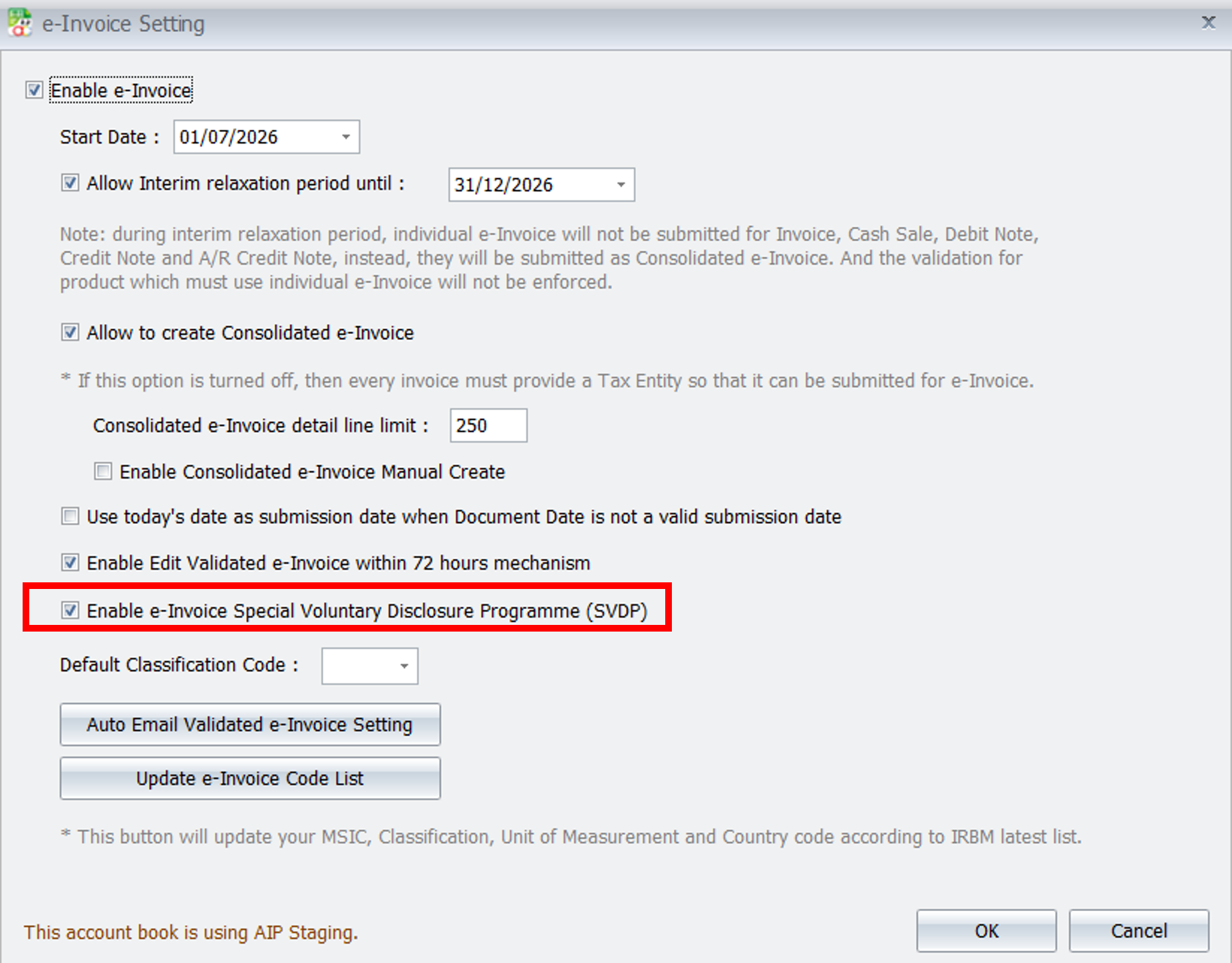
8.10 AutoCount SVDP Setting
Enabling SVDP: Activate via e-Invoice > e-Invoice Setting > Setting > Enable e-Invoice Special Voluntary Disclosure Programme (SVDP)(available until 31/12/2027)
需设置以启用,功能将于2027年12月31日结束SVDP计划时移除
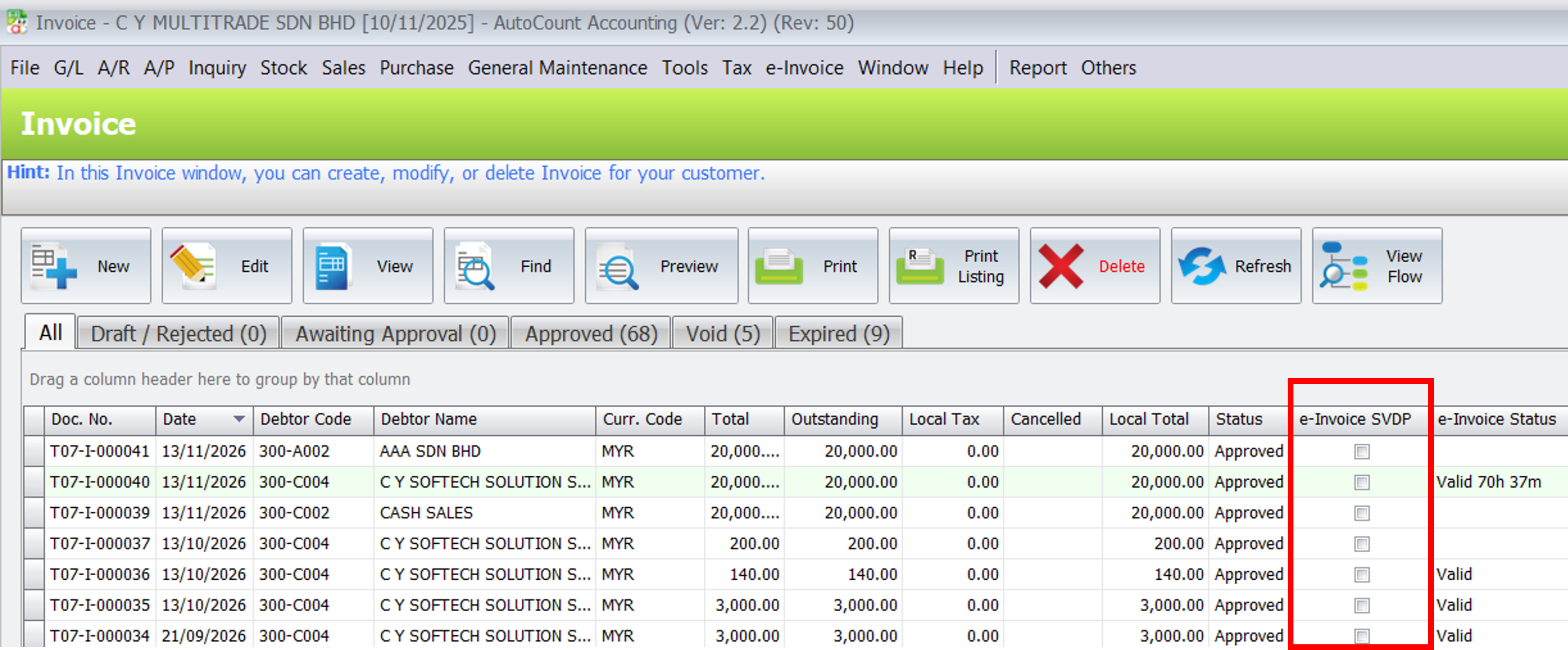
You can check which invoices were submitted via SVDP in Invoice list by dragging from the “Column Chooser”
你可以从 Column Chooser 将 e-Invoice SVDP 拉进 Invoice 中查看哪个交易已经通过 SVDP 计划提交
Available for the following documents 适用于以下文件类型:
- Invoice | 发票
- Cash Sale | 现金销售
- Debit Note, Credit Note | 借项单、贷项单
- AR Credit Note | 应收账款贷项单
- Self-Billed | 自开电子发票
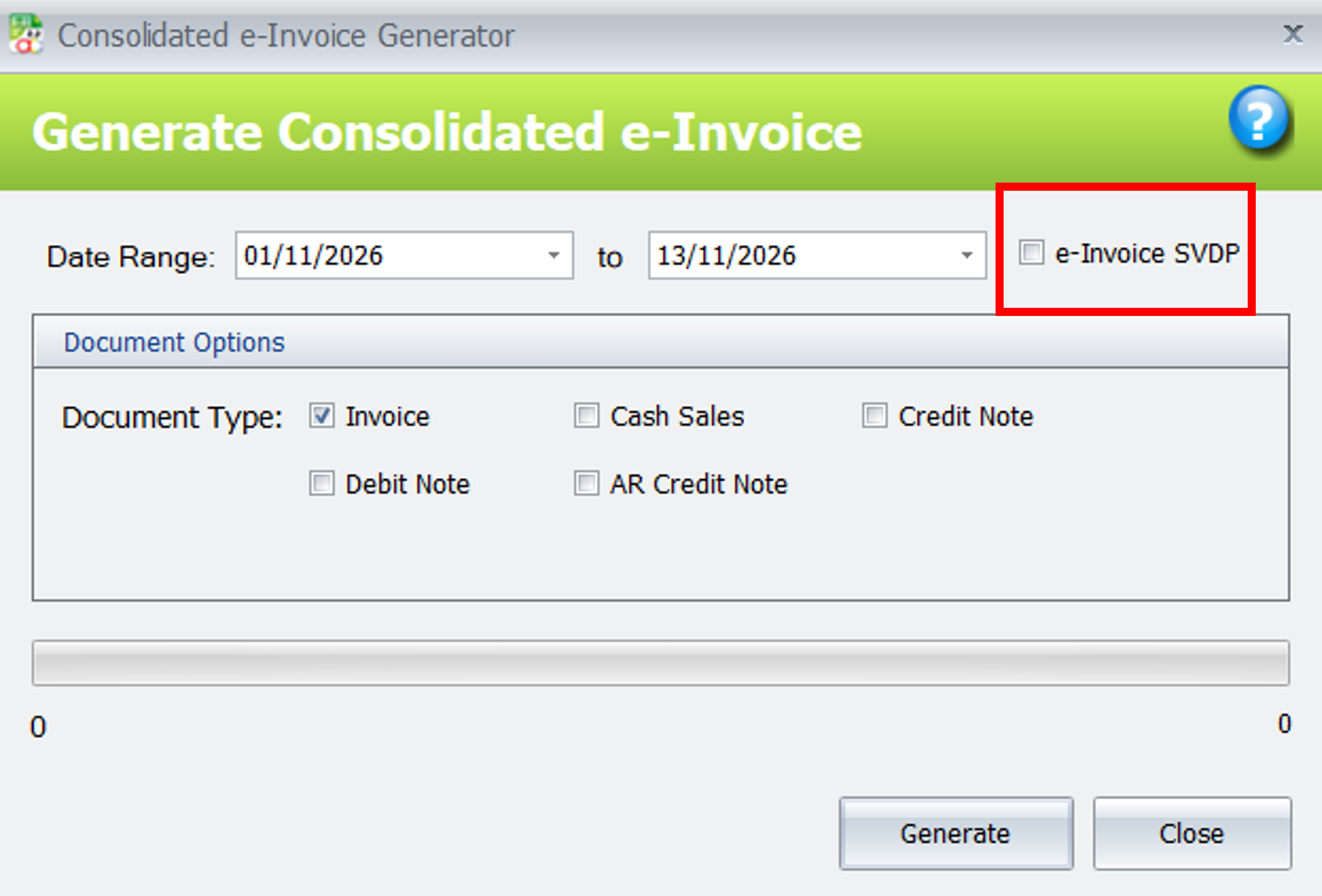
You can now submit Consolidated e-Invoices under SVDP by going to e-Invoice > Consolidated e-Invoice > New and checking e-Invoice SVDP
生成合并电子发票时可勾选 “e-Invoice SVDP” 来提交
*A warning will appear if SVDP is not enabled when consolidating previous month transactions
*如果在合并前几个月的交易时未启用 SVDP,系统将弹出警告提示
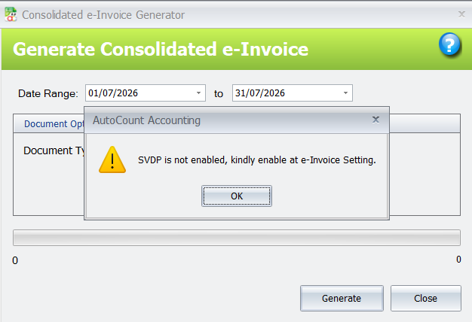
The system now automatically detects late submissions for Consolidated e-Invoices based on the generation date 系统现可根据生成日期自动检测合并电子发票的逾期提交情况:
- On or before the 7th of the current month: Consolidating transactions from 2 or more months earlier is flagged as a late submission.
当月7日及之前:合并两个月或更早之前的交易将被标记为逾期提交。
- After the 7th of the current month: Consolidating transactions from the previous month or earlier is flagged as a late submission.
当月7日之后:合并上个月或更早之前的交易将被标记为逾期提交。
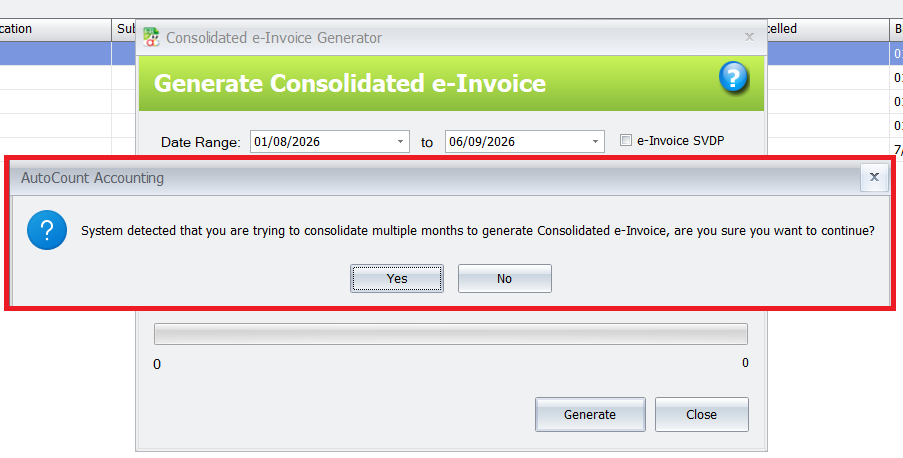
Verify SVDP submissions post-submission via the MyInvois Portal or the e-Invoice SVDP column (in Column Chooser) on the Consolidated e-Invoice screen.
提交后可在MyInvois Portal或e-Invoice SVDP column查看已提交的SVDP合并电子发票
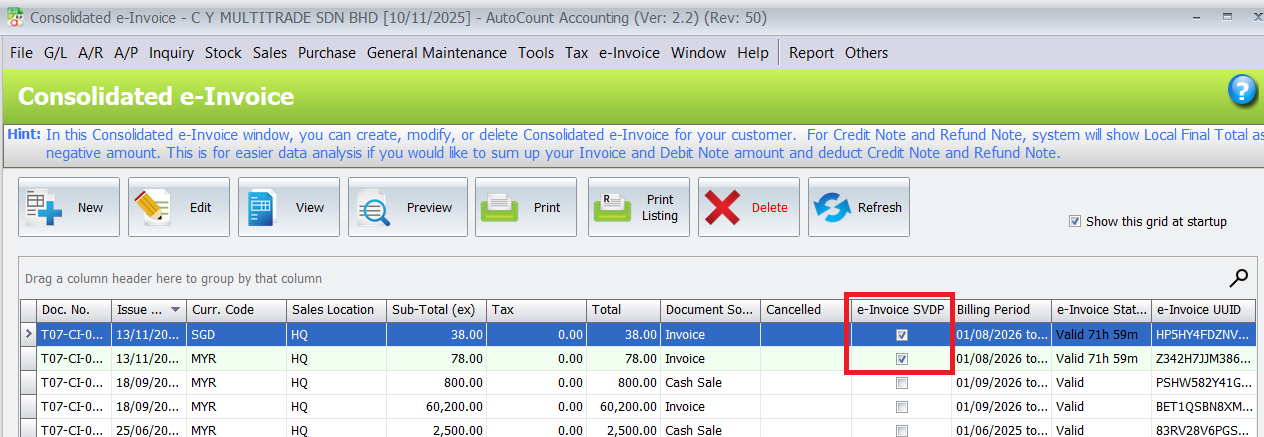
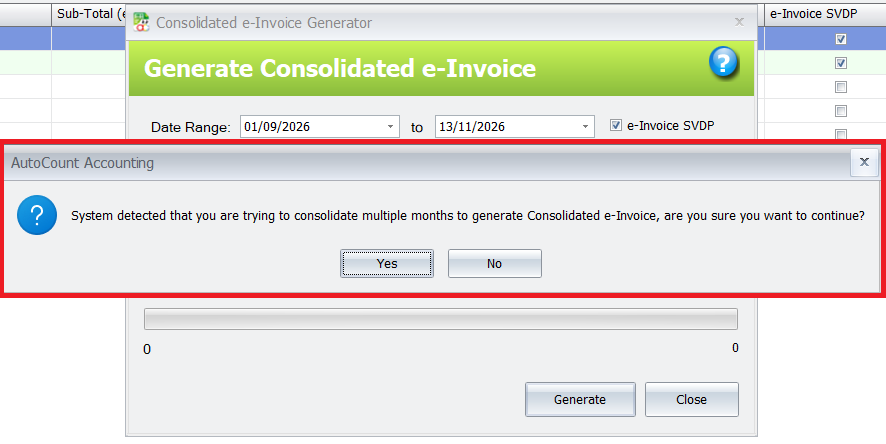
Per the e-Invoice Specific Guidelines, transactions from multiple months cannot be combined into a single Consolidated e-Invoice. The system will now display a warning if you attempt to consolidate transactions across different months.
根据《电子发票专项指南》的要求,不同月份的交易不能合并成一张。因此在尝试将多个月的交易合并为一张合并电子发票时,系统会显示一条警告提示。